9 Best Teachable Alternatives in 2026 (Ranked by Real Creators)
Reading Time
9
Published On
Updated On

Brian Moran
Founder

Samara Lemon
VP of Marketing

Leilani Treuting
Marketing Director

Scott Moran
Co-Founder

SamCart is the digital business platform that builds, runs, and scales your online business. AI handles the hard parts, so you keep more of what you earn.
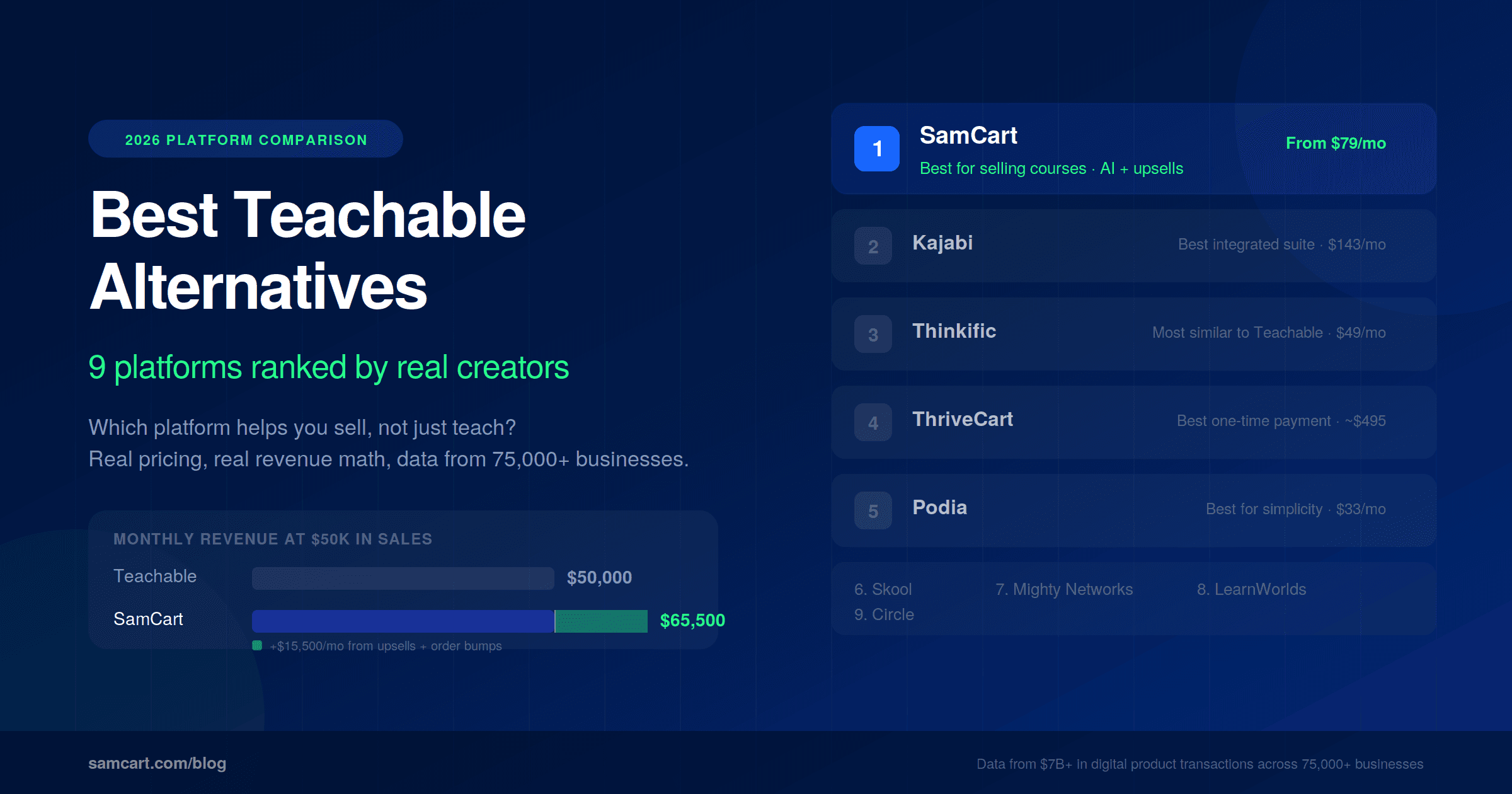
Table of Contents
Title
Share this article
The best Teachable alternative for most course creators in 2026 is SamCart, because it combines course hosting with AI-powered sales pages, one-click upsells, and order bumps that are trained on $7B+ in real transaction data. If your goal is to sell more courses rather than just host them, the platform you choose for sales optimization matters more than the platform you choose for content delivery.
Here's what most "Teachable alternatives" lists won't tell you: the real cost of your course platform isn't the monthly subscription. It's the combination of your subscription, transaction fees, and the revenue you leave on the table because your platform doesn't have built-in sales tools. SamCart data shows that one-click upsells increase average order value by 68%, and order bumps convert at 30-40%. Across 75,000+ businesses and $7B+ in digital product sales, the platforms that help creators sell (not just teach) consistently outperform those that focus on content delivery alone.
Last updated: April 2026
If you're reading this, you've probably already built something worth selling. Maybe you've outgrown Teachable's limitations, or maybe you're evaluating platforms before committing. Either way, this comparison is built on economics and real sales data rather than surface-level feature checklists.
Why Are Creators Leaving Teachable in 2026?
Teachable's mid-2025 pricing overhaul was a tipping point. The changes weren't just a price increase. They were a structural reset that forced every existing customer onto new, more restrictive plans, with no option to keep what they were paying for. The backlash across Reddit, Trustpilot, and creator communities was swift and specific.
The forced migration killed trust. Teachable didn't grandfather existing users into their current plans. Between June and July 2025, every school was automatically migrated to the new pricing structure. Creators who had been paying $119/mo on the old Pro plan woke up to bills of $309/mo just to maintain their existing courses and bundles. One 7-year Teachable user reported their cost nearly tripled overnight. The frustration wasn't just about money. It was that Teachable changed the deal after creators had built their entire business on the platform, knowing that migration is painful enough to keep most people locked in.
Product and student caps punish growth. The new plan structure introduced hard limits that didn't exist before. The Starter plan allows just 1 published product and 100 students. The Builder plan caps at 5 products and 1,000 students. Overage charges apply if you exceed these limits. On Reddit, one creator wrote: "I don't understand why they would increase the price and also set a cap on the number of products and learners." For creators who had been growing freely on previous plans, these caps felt like a penalty for success.
The 7.5% transaction fee on Starter is steeper than it looks. Teachable eliminated its free plan entirely in 2025. The new Starter plan ($39/mo monthly, $29/mo annual) carries a 7.5% transaction fee on every sale, on top of standard payment processing fees of 2.9% + $0.30. That means a $100 course sale on Starter costs $10.70 in combined fees before the creator sees a dollar. At $5,000/month in revenue, that's $375/month in Teachable fees alone, turning a $39 plan into a $414/month expense.
Support complaints are growing. Multiple Trustpilot reviewers report that Teachable's support during the transition relied heavily on AI chatbot responses that didn't address their specific billing or migration concerns. Creators describe feeling like the company is efficient at collecting payments but unresponsive when resolving errors. One Trustpilot reviewer who migrated to another platform wrote: "The combination of increased costs, reduced flexibility, and limited notice created a challenging and frustrating experience."
Limited sales tools haven't improved. While the pricing changed, the product didn't evolve to match. Teachable still has no native one-click upsells, no order bumps, and limited A/B testing. Once a pricing plan is created, it's locked. You can't adjust the price or billing cycle without archiving and recreating it. There's no built-in way to upsell digital downloads post-checkout. For creators focused on maximizing revenue per student, these gaps mean bolting on third-party tools or simply leaving money on the table.
No meaningful AI features. In a market where other platforms can build entire sales pages from a product description, Teachable's tools haven't kept pace. The course builder experience remains what one reviewer called "clunky and linear," and the design options are functional but not built for conversion. Creators are spending hours on copy and design that other platforms generate in minutes.
The mobile experience is fragmented. Students using the iOS app can't access the community space. There's no Android app. Creators managing their schools on mobile face an inconsistent experience where many key operations still require a desktop browser.
The bottom line is that Teachable was built to be a course hosting platform. That was enough five years ago. In 2026, the creators who are switching are the ones who realized they need a platform that hosts content AND sells it. Hosting is the commodity. Selling is the differentiator.
What Should You Look for in a Teachable Alternative?
Before comparing specific platforms, here's the decision framework that actually matters for course creators evaluating alternatives.
Transaction fees vs. flat pricing. Some platforms charge a percentage of every sale. Others charge a flat monthly fee regardless of revenue. At low revenue, percentage-based pricing feels cheap. At scale, it becomes devastating. A 7.5% transaction fee on $10,000/month in revenue costs $750/month. At $50,000/month, that's $3,750/month in fees alone.
Built-in sales tools. One-click upsells, order bumps, A/B testing, and checkout optimization aren't nice-to-haves. They're the difference between a $47 average order value and a $100+ average order value. If your platform doesn't include these natively, you're either paying for add-ons or missing the revenue entirely.
AI capabilities. Can the platform build your sales page from a course description? Can it write checkout copy? Is the AI trained on generic internet data, or on real conversion data from actual digital product sales?
Course and community features. Does the platform handle course hosting, membership access, and community in one place? Or do you need to stitch together multiple tools?
Migration difficulty. How painful is it to move your existing courses, students, and content? Some platforms make this seamless. Others make it a multi-week project.
Total cost of ownership at scale. This is the number that matters most. Don't compare monthly subscription prices in isolation. Compare what you'll actually pay when your business is doing $10K, $50K, or $100K per month in revenue.
9 Best Teachable Alternatives in 2026 (Ranked)
1. SamCart: Best for Selling Courses
SamCart is the digital business platform that builds, runs, and scales your online business. For course creators specifically, it combines course hosting with the most advanced sales optimization tools in the market.
What sets SamCart apart is the AI. SamCart's AI builds your sales page from your course description, and it's not a generic language model. It's trained on $7B+ in real transaction data across 75,000+ businesses, so it knows what actually converts for digital products. No other platform has this data.
Built-in one-click upsells increase average order value by 68%. Order bumps convert at 30-40%. A/B testing lets you optimize headlines, pricing, and page layouts without third-party tools. These aren't add-ons. They're core features on every plan.
Pricing: Starts at $79/mo with every feature included from day one. No gated plans, no feature limits. Your price scales up only as your revenue grows inside SamCart. No transaction fees on your sales. You only pay more after you're making more.
Best for: Course creators who want to sell more, not just host content. Especially strong for creators with existing audiences who are leaving revenue on the table without upsells and order bumps.
For a detailed head-to-head, see the full SamCart vs Teachable comparison.
2. Kajabi: Best for an Integrated Suite (If Budget Allows)
Kajabi is the most comprehensive platform in this list. It combines courses, community, email marketing, website builder, podcasting, and sales funnels under one roof. If you want everything in a single login and budget isn't your primary constraint, Kajabi delivers.
Pricing: Basic starts at $179/mo monthly ($143/mo annual). No transaction fees on any plan. The Kickstarter tier ($89/mo) was removed from public pricing in January 2026, making $143/mo the true entry point.
Strengths: Excellent email marketing and automation. Strong community features. Good course builder with completion tracking. The integrated ecosystem means fewer tools to manage.
Weaknesses: The most expensive entry point in the course platform market. AI features are basic and generic, not trained on conversion data. No native one-click upsells. Product limits on lower tiers (Basic allows 5 products, and bundles/memberships count toward that cap). Contact limits can also become restrictive: Basic caps at 2,500 contacts.
Best for: Established creators with budget to invest who want a true "everything under one roof" experience and prioritize email marketing automation.
For more on how Kajabi compares across the board, see our best Kajabi alternatives guide.
3. Thinkific: Most Similar to Teachable
If you want the closest experience to Teachable with fewer friction points, Thinkific is the natural switch. The interface feels familiar, the course builder uses drag-and-drop, and it includes quizzes, certificates, and student discussions.
Pricing: Basic at $49/mo, Start at $99/mo, Growth at $199/mo. No transaction fees on any paid plan. A free plan was previously available but may have limited availability in 2026.
Strengths: Intuitive course builder. Good student engagement tools (quizzes, certificates, discussions). No transaction fees on paid plans. Reasonable pricing at the entry level.
Weaknesses: Limited sales optimization. Basic upsell capabilities compared to dedicated selling platforms. No AI page builder. Email marketing is limited and most creators need a third-party email tool.
Best for: Course creators who want a straightforward Teachable replacement with similar UX and no transaction fees.
4. ThriveCart (with Learn+): Best for One-Time Payment
ThriveCart's lifetime deal (typically $495-$895 one-time) makes it the only platform on this list with no recurring monthly fee. The Learn+ add-on enables course hosting, turning ThriveCart from a checkout tool into a course platform.
Pricing: One-time payment of $495-$895 (prices vary by promotion). No monthly fees. Standard payment processing fees still apply.
Strengths: No monthly subscription means the lowest total cost of ownership over time. Strong cart and checkout features. Good affiliate management.
Weaknesses: Course hosting through Learn+ is basic compared to dedicated course platforms. Limited community features. No AI tools. The interface can feel dated. Course creation capabilities are an add-on, not the core product.
Best for: Budget-conscious creators who primarily need checkout optimization and are willing to accept simpler course hosting.
5. Podia: Best for Simplicity
Podia strips away complexity. The interface is clean, the setup is fast, and you can sell courses, digital downloads, coaching, and webinars from one dashboard.
Pricing: Mover at $39/mo monthly ($33/mo annual) with a 5% transaction fee. Shaker at $75/mo annual with 0% transaction fee. No free plan (discontinued in 2024). 30-day free trial available.
Strengths: Extremely easy to use. Built-in email marketing on all plans. Unlimited courses and products on both plans. Good for creators selling multiple product types (courses + downloads + coaching).
Weaknesses: Limited customization. Basic sales tools with no one-click upsells or advanced checkout optimization. No AI features. The 5% transaction fee on the Mover plan adds up quickly.
Best for: Beginners who want to get selling fast with minimal technical setup and don't need advanced conversion optimization.
6. Skool: Best for Community-First
Skool combines community, courses, and gamification (leaderboards, points, badges) in a format that feels more like a social network than a course platform. If your business model depends on community engagement and retention, Skool does this better than anyone.
Pricing: Hobby at $9/mo with a 10% transaction fee. Pro at $99/mo with 2.9% + $0.30 per transaction. Each community requires its own subscription.
Strengths: Best-in-class community experience. Gamification drives engagement and retention. Simple, opinionated design that's easy for members to use. Strong discovery features.
Weaknesses: Limited sales tools. No upsells, no order bumps, no A/B testing. No AI page builder. Course features are basic (no quizzes, no certificates, no drip content). The 10% fee on Hobby and per-community pricing can add up for creators running multiple groups.
Best for: Coaches and community builders whose primary value is the group experience, not the course content alone.
7. Mighty Networks: Best for Live Courses
Mighty Networks combines courses with community, events, and a native mobile app. The app experience is a genuine differentiator: members get a branded app that feels like a dedicated product, not a website viewed on a phone.
Pricing: Plans start at $41/mo for the Community plan. Course features require the Business plan at $119/mo. Mighty Pro (custom pricing) includes a fully branded app.
Strengths: Native mobile app. Strong live course and event features. Good community tools. Ability to combine courses, community, and events in one branded experience.
Weaknesses: Complex setup process. Limited sales optimization and checkout features. No AI page builder. Can feel overwhelming for simple course-only businesses.
Best for: Creators building community-powered live courses who want a native mobile app experience.
8. LearnWorlds: Best for Training and Certification
LearnWorlds is built for structured learning. If you're creating professional training, certification programs, or compliance courses, it has the deepest assessment and credentialing tools in this category.
Pricing: Starter at $29/mo with a $5 per course sale fee. Pro Trainer at $99/mo with no transaction fees. Learning Center at $299/mo for advanced features.
Strengths: Advanced assessment tools (graded assignments, randomized exams). SCORM compliance. Certificate generation. Interactive video. Strong for professional and corporate training.
Weaknesses: Interface can feel clunky. Limited marketing and sales tools. Not designed for creators focused on conversion optimization. Starter plan's per-sale fee is punitive at volume.
Best for: Professional trainers, corporate educators, and anyone building certification programs that require structured assessments.
9. Circle: Best for Community Only (No Course Hosting)
Circle is a community platform built by Teachable's original designer. The design sensibility shows: Circle's UX is clean, modern, and intuitive. But it's important to understand what Circle is and isn't. It's a community tool, not a course platform.
Pricing: Starts at $89/mo for the Professional plan. Business plan at $219/mo. Enterprise at custom pricing.
Strengths: Beautiful community UX. Flexible space-based architecture. Strong moderation tools. Good integrations with course platforms and payment tools.
Weaknesses: No native course hosting. You need a separate platform for course delivery and a separate tool for checkout and sales. The $89/mo starting price is high for a single-purpose community tool.
Best for: Creators who already have a course platform and checkout solution and need a dedicated, polished community experience.
Feature Comparison Table: Teachable Alternatives at a Glance
Platform | Monthly Price | Transaction Fees | Course Hosting | AI Page Designer | One-Click Upsells | A/B Testing |
|---|---|---|---|---|---|---|
SamCart | From $79/mo (scales with revenue) | 0% | Yes | Yes (trained on $7B+ data) | Yes (68% higher AOV) | Yes |
Kajabi | From $143/mo (annual) | 0% | Yes | No | No | Limited |
Thinkific | From $49/mo | 0% | Yes | No | Basic | No |
ThriveCart | ~$495-$895 one-time | 0% | Yes (Learn+) | No | Yes | Yes |
Podia | From $33/mo (annual) | 5% on Mover, 0% on Shaker | Yes | No | No | No |
Skool | From $9/mo | 10% on Hobby, 2.9% on Pro | Yes | No | No | No |
Mighty Networks | From $41/mo | Varies | Yes | No | No | No |
LearnWorlds | From $29/mo | $5/sale on Starter | Yes | No | No | No |
Circle | From $89/mo | 0% | No | No | No | No |
How Much Does Teachable Really Cost at Scale? (The Math Nobody Shows You)
This is where the conversation gets real. Most comparison articles list monthly subscription prices and move on. But subscription price is the wrong number to compare. The right number is net revenue: what you keep after platform costs, minus the revenue you never captured because your platform didn't have the tools to capture it.
SamCart uses a revenue-based pricing model: every feature is included from day one (upsells, order bumps, A/B testing, AI, courses), and your subscription scales as your business grows. There are no gated plans and no transaction fees. Teachable uses traditional tiered plans where features are gated and the Starter plan charges a 7.5% transaction fee.
Here's where it gets interesting. SamCart's data shows that one-click upsells increase average order value by 68%, and order bumps convert at 30-40%. Let's model what that actually means in dollars at each revenue level. We'll use a conservative 35% order bump take rate on a $47 bump, and a 15% upsell take rate on a $97 upsell, to keep the math grounded.
At $5,000/month in base course revenue (roughly 100 sales at $50 avg):
Teachable Builder | SamCart | |
|---|---|---|
Platform cost | $89/mo | $129/mo |
Order bump revenue (35% take rate on $47) | $0 (not available) | +$1,645/mo |
Upsell revenue (15% take rate on $97) | $0 (not available) | +$1,455/mo |
Total monthly revenue | $5,000 | $8,100 |
Revenue after platform cost | $4,911 | $7,971 |
SamCart costs $40/month more in subscription but generates an estimated $3,100/month in additional revenue from order bumps and upsells that Teachable doesn't offer. That's an extra $37,200/year from the same traffic.
At $10,000/month in base course revenue (roughly 200 sales at $50 avg):
Teachable Builder | SamCart | |
|---|---|---|
Platform cost | $89/mo | $219/mo |
Order bump revenue (35% × $47 × 200) | $0 | +$3,290/mo |
Upsell revenue (15% × $97 × 200) | $0 | +$2,910/mo |
Total monthly revenue | $10,000 | $16,200 |
Revenue after platform cost | $9,911 | $15,981 |
SamCart costs $130/month more but generates $6,200/month in expansion revenue. That's $6,070/month more in your pocket after platform costs. Creators at this level are also likely hitting Teachable Builder's 5-product and 1,000-student caps, forcing an upgrade to Growth at $189/month.
At $50,000/month in base course revenue (roughly 500 sales at $100 avg):
Teachable Growth | SamCart | |
|---|---|---|
Platform cost | $189/mo | $499/mo |
Order bump revenue (35% × $47 × 500) | $0 | +$8,225/mo |
Upsell revenue (15% × $97 × 500) | $0 | +$7,275/mo |
Total monthly revenue | $50,000 | $65,500 |
Revenue after platform cost | $49,811 | $65,001 |
The subscription difference is $310/month. The revenue difference is $15,500/month. SamCart generates an estimated $15,190/month more in net revenue. That's $182,280/year in additional revenue from the same customer base.
At $100,000/month in base course revenue (roughly 1,000 sales at $100 avg):
Teachable Growth | SamCart | |
|---|---|---|
Platform cost | $189/mo | $849/mo |
Order bump revenue (35% × $47 × 1,000) | $0 | +$16,450/mo |
Upsell revenue (15% × $97 × 1,000) | $0 | +$14,550/mo |
Total monthly revenue | $100,000 | $131,000 |
Revenue after platform cost | $99,811 | $130,151 |
SamCart's subscription is $660/month higher. SamCart's expansion revenue is $31,000/month higher. The net difference: $30,340/month more in your pocket with SamCart. That's $364,080/year in additional revenue that Teachable's platform structurally cannot capture because it doesn't have the tools.
The pattern is clear at every level: SamCart's higher subscription pays for itself many times over through expansion revenue features that Teachable doesn't offer at any price tier. The question was never "which platform costs less?" It was always "which platform makes me more?"
Use the Creator Revenue Calculator to model what upsells and order bumps would add to your specific numbers.
Note: Revenue projections above use conservative assumptions (35% order bump take rate, 15% upsell take rate) based on SamCart platform data. Actual results vary by offer, audience, and price point. All calculations exclude standard payment processing fees (typically 2.9% + $0.30 per transaction), which apply regardless of platform.
How to Migrate from Teachable (Step by Step)
Switching platforms feels overwhelming until you break it into steps. Most Teachable migrations take 1-2 weeks when you follow this process.
Step 1: Export your course content. Download all video files, PDFs, worksheets, and other materials from Teachable. Tip: if your videos are hosted on a third-party service like Vimeo, they're already portable. You just need to re-embed them on the new platform.
Step 2: Download your student list. Export your student emails and enrollment data from Teachable's admin. This is your most valuable asset. Back it up in multiple places.
Step 3: Set up your new platform. Create your account, configure payment processing, and familiarize yourself with the new interface before migrating content.
Step 4: Recreate your courses. Upload your content to the new platform. If you're moving to SamCart, the AI can build your sales pages from your course description, significantly reducing the time spent on copywriting and page design.
Step 5: Set up redirects. If your Teachable course URLs are linked from email sequences, social media, or other marketing materials, set up URL redirects so existing links point to your new pages.
Step 6: Notify your students. Send a clear email explaining the move, what changes (new login, new URL), and what doesn't change (their access, their progress if applicable). Offer support for any login issues during the transition.
Step 7: Test everything before switching. Process a test transaction. Walk through the entire student experience from purchase to course access. Check your pages on mobile. Verify email notifications are firing correctly.
For a complete guide on building your course business from scratch, see how to sell online courses in 2026.
Choose the Platform That Helps You Sell
Every platform on this list can host a course. That's the easy part. The hard part, and the part that determines whether your course business actually grows, is selling. The checkout experience, the upsell strategy, the page design, the conversion optimization.
Teachable was built to teach. SamCart was built to sell. If you're looking for a Teachable alternative that does both, start your free trial and let SamCart's AI build your course sales page in minutes. Or use the Creator Revenue Calculator to see what upsells and order bumps would add to your current course revenue.
SamCart Editorial Team
Brian Moran
Founder
Samara Lemon
VP of Marketing
Leilani Treuting
Marketing Director
Scott Moran
Co-Founder
Frequently Asked Questions
Can I migrate my students from Teachable to another platform?
Yes. Teachable allows you to export your student email list and enrollment data from the admin dashboard. You can import this list into your new platform and send students updated access instructions. Course progress data typically doesn't transfer between platforms, so students may need to re-access content from the beginning on the new platform.
Will I lose my course content when I leave Teachable?
No, as long as you download everything before canceling. Export all video files, PDFs, and other materials. If your videos are hosted on a third-party service like Vimeo or Wistia, they're already stored outside Teachable and just need re-embedding. Always download before you cancel your Teachable subscription.
Is SamCart good for hosting and selling online courses?
Yes. SamCart includes course hosting, membership and community features, and the most advanced sales optimization tools in the category. The key differentiator is that SamCart's AI is trained on $7B+ in real transaction data, so it builds sales pages and checkout flows based on what actually converts for digital products. It combines what you'd need Teachable plus a separate sales page builder plus a checkout optimizer to do.
What's the cheapest Teachable alternative with no transaction fees?
Thinkific Basic at $49/mo offers course hosting with no transaction fees. Podia Shaker at $75/mo (annual) includes courses, email marketing, and no transaction fees. SamCart at $79/mo includes courses plus advanced sales tools with no transaction fees. ThriveCart's one-time purchase ($495-$895) has no monthly fee or transaction fees but offers more limited course features.
Can I use multiple platforms together?
Yes, and many creators do. A common combination is a dedicated sales platform (like SamCart for checkout, upsells, and order bumps) paired with a community tool (like Circle or Skool). The tradeoff is complexity. Using multiple platforms means managing integrations, and the more tools involved, the more potential points of failure. A single platform that handles both sales and delivery simplifies your stack significantly.
How long does migration from Teachable typically take?
Most migrations take 1-2 weeks. The timeline depends on how many courses you're moving, how much content needs re-uploading, and whether you need to rebuild sales pages from scratch (SamCart's AI accelerates this significantly). Budget extra time if you have complex email automations or affiliate relationships that need reconfiguring.