How to Sell Online Courses in 2026: 9 Steps from Idea to Revenue
Reading Time
8
Published On
Updated On

Brian Moran
Founder

Samara Lemon
VP of Marketing

Leilani Treuting
Marketing Director

Scott Moran
Co-Founder

SamCart is the digital business platform that builds, runs, and scales your online business. AI handles the hard parts, so you keep more of what you earn.
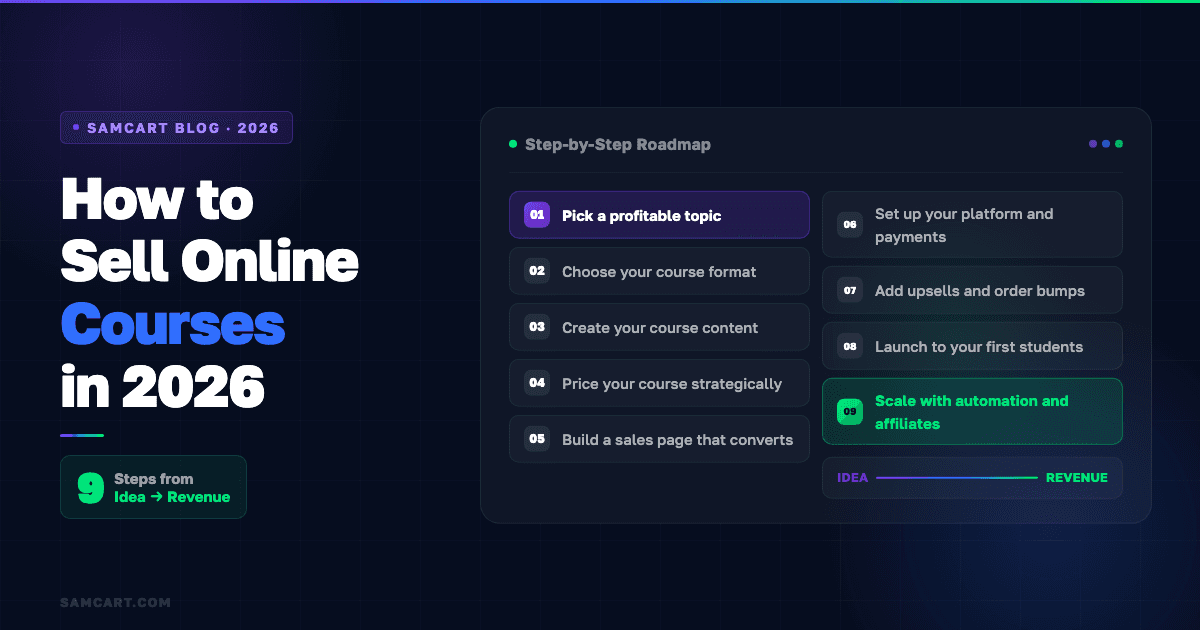
Table of Contents
Title
Share this article
To sell an online course, you need nine things: a validated topic, the right format, course content, strategic pricing, a high-converting sales page, a platform that handles payments and delivery, upsells to increase your revenue per student, a launch strategy, and automation to keep selling on autopilot. Most creators get the "create" part right but skip the selling infrastructure that actually generates revenue.
Here's the step-by-step process that 75,000+ creator businesses on SamCart use to sell online courses, backed by $7B+ in real transaction data. The biggest insight from all that data? The difference between a course that makes $500 and a course that makes $50,000 usually isn't the content. It's the sales page, the pricing, and the checkout experience. SamCart's CreatorAI Assistant handles the heavy lifting across the entire workflow: designing courses, creating eBooks, writing sales pages, generating opt-in pages, brainstorming upsell ideas, writing upsell scripts, and creating social media content. Creators who add a single upsell to their course checkout see a 42% increase in Day 1 average order value.
Online courses are still one of the best digital products you can sell in 2026. The global e-learning market is projected to surpass $450 billion this year, and it's growing at over 20% annually. AI has made course creation 10x faster than it was even two years ago. And the demand for skills-based learning is accelerating as more professionals invest in their own development.
But here's what most "how to sell courses" guides get wrong. They focus on creation. They walk you through outlining modules, recording videos, and choosing between Teachable and Thinkific. That's all useful. But it skips the part that actually determines whether you make money: how you sell.
This guide is built around the selling strategy. Because your course content is only as valuable as the system you build around it to turn visitors into buyers.
The 9-step process to sell online courses
Step 1: Pick a profitable topic (validate before you build)
The biggest mistake new course creators make is building a course nobody wants to buy. They pick a topic they're passionate about, spend weeks recording content, and then wonder why nobody signs up.
Before you create anything, validate demand. Here's the simplest test: can you find 10 people who would pay for this?
Not sure where to start? SamCart's CreatorAI Assistant can help you identify potential markets and target audiences before you build anything. Tell it what you're good at, and it helps you narrow down profitable niches and product ideas based on what's actually selling. It's like having a brainstorming partner that's seen what works across 75,000+ creator businesses.
How to validate in a weekend:
Go where your potential students already hang out. Search Reddit, Facebook groups, and LinkedIn for people asking questions about your topic. Look for patterns. If the same questions come up repeatedly, that's demand.
Survey your existing audience (even if it's small). Ask: "If I created a course on [topic], what specific problem would you want it to solve?" The answers tell you exactly what to build.
Pre-sell before you create. Set up a simple sales page describing the course outcome, price it, and see if anyone buys. If 10 people pay before the course exists, you've got validation. If nobody bites, you just saved yourself weeks of wasted effort.
The "10-person test" works because it forces you to prove demand with real money, not just enthusiasm. A friend saying "that sounds cool" is not validation. Someone pulling out their credit card is.
Step 2: Choose your course format
Not every course needs to be a 40-hour certification program. Your format should match your topic, your audience, and your price point.
Self-paced courses are the most common. Students buy once and work through pre-recorded modules on their own schedule. These dominate in volume because they're convenient for students and scalable for creators. Once you record the content, you can sell it to unlimited students with no additional time investment.
Cohort-based courses run on a fixed schedule with a defined start and end date. Students go through the material together, often with live sessions, group discussions, and accountability structures. Cohort courses typically command 2-5x higher pricing than self-paced because the community and live access add significant perceived value. Completion rates are also dramatically higher.
Mini-courses are short, focused courses (usually under 2 hours) that solve one specific problem. They work well as entry-level products that introduce students to your teaching style before they invest in a larger program.
Hybrid models combine pre-recorded content with live elements like weekly Q&A calls, office hours, or community access. This gives you the scalability of self-paced delivery with the premium pricing of cohort-based programs.
For your first course, start with self-paced or a mini-course. Get something out the door, learn what your students actually need, and iterate from there. Don't wait for perfection. Launch with a minimum viable course and improve based on real feedback.
Step 3: Create your course content (AI makes this fast)
Here's where most creators get stuck. They think they need professional video equipment, perfect lighting, and Hollywood-level editing. They don't.
The minimum viable course needs three things: an outline, recorded content, and supporting materials. That's it.
Use AI to build your outline and your course content. SamCart's CreatorAI Assistant can design and structure your entire course, from topic selection to module outlines to lesson content. It can also create a complete eBook if your course includes written materials. Feed it your topic and target audience, and it generates a structured course tailored to your students' specific needs. AI builds your sales page and writes your copy, but it also handles course development, so you can go from idea to published course without switching between tools.
Record with what you have. A smartphone with decent audio is enough for your first course. Screen recordings work great for tutorial-style content. Slide presentations with voiceover work for concept-heavy material. Your students care about the transformation you deliver, not your production quality.
Keep modules short. Aim for 5-15 minutes per lesson. Students have limited attention spans, and shorter modules create a sense of progress that keeps people coming back. Total course length of 3-5 hours is a sweet spot for most topics.
Don't over-produce. The creators who make the most money on SamCart aren't the ones with the fanciest videos. They're the ones who launched quickly, gathered feedback, and improved over time. Launch at 80% quality and iterate. A course that exists and sells beats a perfect course that lives on your hard drive.
Step 4: Price your course strategically
Pricing is where psychology meets math, and most creators get it wrong by pricing too low.
Here are the pricing tiers that perform well across 75,000+ SamCart creator businesses:
Mini-courses: $27-$97. Short, focused courses that solve one specific problem. These work as entry products that lead to bigger purchases.
Signature courses: $197-$997. Your core course with comprehensive content, worksheets, and community access. This is where most successful creators generate the bulk of their revenue.
Premium programs: $997-$4,997. Courses with coaching, live sessions, certification, or done-with-you elements. These require more of your time but generate significantly higher revenue per student.
Why $47 is the worst price point. It's too high for an impulse purchase and too low to signal real value. Students see a $47 course and assume it's a glorified blog post. Price at $27 (impulse buy) or $97+ (perceived value), but avoid the dead zone in between.
The real pricing insight: your price determines your entire business model. A $47 course means you need 1,064 students to hit $50,000. A $497 course means you need 101 students. Same revenue, completely different marketing strategy. Higher-priced courses also attract more committed students who get better results and leave better testimonials.
Step 5: Build a sales page that converts
This is the step most course creators skip entirely, and it's the reason most courses fail to sell.
A course landing page is not a sales page. A course landing page describes your course. A sales page persuades someone to buy it. The difference in conversion rate between the two can be 5-10x.
Every high-converting sales page needs these elements:
A headline that speaks to the transformation, not the topic. "Become a Confident Public Speaker in 30 Days" sells. "Public Speaking Course" doesn't.
A clear picture of the problem your student is experiencing right now. Get specific. Use the exact words your audience uses to describe their frustration.
The transformation you're promising. What will their life, career, or business look like after completing your course? Paint the picture.
Social proof. Testimonials, case studies, student results. If you're launching for the first time, use results from your own experience or offer the course to a small beta group in exchange for testimonials.
A risk reversal. Money-back guarantee, conditional guarantee, or free preview. Remove the fear of wasting money.
A clear, repeated call to action. Don't make people hunt for the buy button.
SamCart's CreatorAI Assistant builds this entire page for you. Give it your product overview, target audience, key benefits, the core problem you solve, and your unique selling points, and it generates conversion-focused sales copy ready to publish. Once the copy is generated, one click takes you straight into SamCart's page builder with your copy pre-loaded and your product pre-selected. No copying and pasting between tools. The AI also generates social media content to promote your course and creates opt-in pages for lead magnets, so your entire marketing stack is covered from one place.
Step 6: Set up your platform and payments
Your platform choice matters more than most creators realize, because checkout conversion is the single most overlooked factor in course revenue.
Think about it: if your sales page convinces 100 people to click "buy" but your checkout only converts 30 of them, you're losing 70 sales. Most creators spend all their time on marketing and zero time on checkout optimization.
Here's how the main options compare for selling courses:
Platform | Starting Price | AI Tools | Course Hosting | Checkout Optimization | Upsells |
|---|---|---|---|---|---|
SamCart | $79/mo | Full AI (courses, eBooks, sales pages, upsell scripts, social content) | Yes (unlimited) | 3-4x industry avg | One-click upsells |
Teachable | Free / $59/mo | Basic | Yes | Standard | Basic |
Thinkific | Free / $49/mo | Basic (outlines) | Yes | Standard | Limited |
Kajabi | $179/mo | Limited | Yes | Standard | Yes |
SamCart's unique angle for course sellers: it's the only platform with AI fine-tuned on real transaction data, not generic language models. And every feature (upsells, order bumps, A/B testing, cart abandonment recovery) is included on every plan at $79/month. No tier-gating.
Course hosting on SamCart includes unlimited courses, unlimited students, built-in video hosting, drip content, quizzes, and worksheets.
Step 7: Add upsells and order bumps (the revenue multiplier most creators skip)
This is the single biggest revenue lever most course creators never pull. Adding upsells and order bumps to your checkout can dramatically change your business economics.
What's an upsell? After a student purchases your main course, you offer a complementary product on the thank-you page. "You just bought the Photography Basics course. Want the Advanced Editing Masterclass for 50% off?" One click, and the purchase is added to their order.
What's an order bump? A checkbox offer on the checkout page itself. "Add the Lightroom Presets Pack for $27." The student checks a box and it's added to their order before they even complete the purchase.
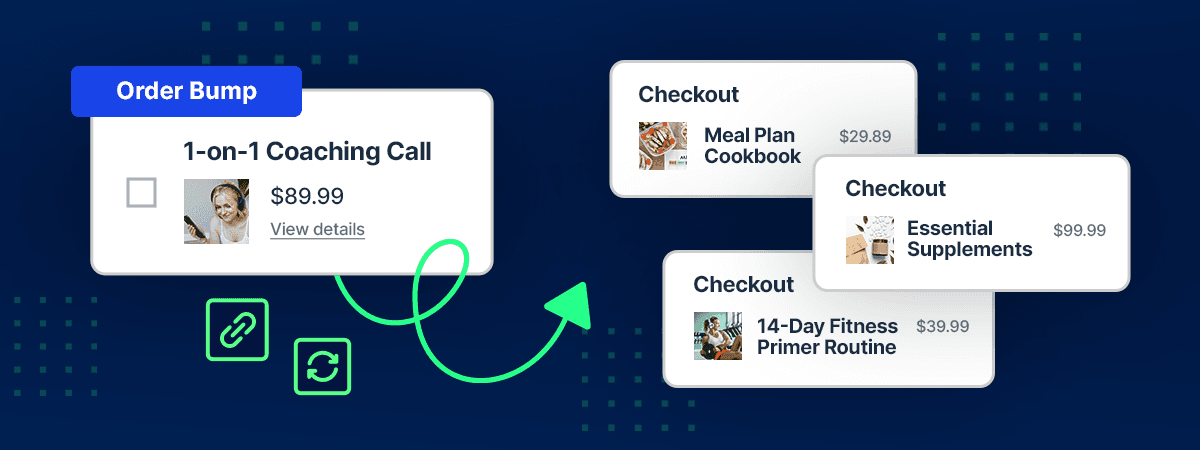
The math that changes everything:
SamCart creators who use one-click upsells that boost AOV by 68% see a dramatic shift in their revenue per student. If you're selling a $197 course, adding a $97 upsell that converts at even 30% means your average order value jumps from $197 to $226. That's an extra $29 per student. Across 200 students, that's $5,800 in additional revenue you would have left on the table.
Order bumps convert at 30-40% on average across SamCart checkouts. A $27 order bump on a $197 course adds roughly $9-$11 in average revenue per checkout. That's pure profit on a product you create once.
What to offer as an upsell: Templates, workbooks, or resource packs that complement the course. An advanced or "next level" course. Coaching or office hours access. A community membership. A done-for-you implementation guide.
Not sure what to offer? SamCart's CreatorAI Assistant can generate upsell ideas based on your current products and customer base, then write the actual upsell scripts for you. It analyzes your offerings and suggests complementary products that make sense for your specific audience.
Most platforms don't even offer one-click upsells. This is one of the biggest reasons course creators switch to SamCart.
Step 8: Launch to your first students
You don't need a massive audience to launch successfully. You need a strategy that matches your current situation.
Warm launch (you have an existing audience, even a small one). Email your list, post on social media, and reach out to people who've expressed interest. Create a 5-7 day launch window with a special introductory price. Send a sequence: announcement, value email, FAQ/objection handling, last chance. This works with an email list as small as 100-200 people if they're the right people.
Webinar launch (you need to build trust first). Host a free 60-90 minute training that delivers real value on your course topic. Teach for 45-60 minutes, then present your course as the natural next step. Webinar-to-course conversion rates typically run 5-15% for a well-targeted audience. Record the webinar and use it as an evergreen sales tool afterward.
Paid traffic launch (you need to build an audience fast). Run Facebook, Instagram, or YouTube ads to a landing page offering a free lead magnet related to your course topic. Nurture leads with a 3-5 email sequence, then present your course offer. This requires budget ($500-$2,000 to test) and works best when you already have a proven offer and sales page.
For your first launch, go warm. Even if your audience is small, launching to people who already know you will generate your first sales, first testimonials, and first feedback. You can scale from there.
Step 9: Scale with automation and affiliates
Once you've validated your course with a successful launch, it's time to move from "launch-dependent" to "always selling."
Build an evergreen funnel. Take your best-performing webinar or launch sequence and automate it. New leads enter the sequence, receive value, and get presented with your course offer on autopilot. This means your course sells every day, not just during launch windows.
Set up email follow-up sequences. Most people don't buy the first time they see your offer. An automated email sequence (typically 5-7 emails over 10-14 days) that addresses objections, shares student success stories, and provides additional value can recover 20-30% of people who didn't buy initially.
Launch an affiliate program. Give satisfied students, industry peers, and content creators a way to promote your course in exchange for a commission (typically 20-40%). SamCart's built-in Affiliate Center makes this simple to manage. Affiliates bring you warm, pre-sold traffic that converts at higher rates than cold traffic.
Keep improving your sales page and checkout. A/B test headlines, pricing, guarantees, and upsell offers. Small improvements compound. A 1% increase in checkout conversion rate across 10,000 visitors per year is 100 additional sales.
Best platforms to sell online courses
For a detailed platform comparison, see our full guide to the best online teaching platforms. Here's the short version for course sellers.
SamCart is the best choice if your priority is maximizing revenue per student. The CreatorAI Assistant handles the full workflow: designing courses, creating eBooks, writing sales pages, generating opt-in pages, brainstorming upsell ideas, writing upsell scripts, and creating social media content to promote your course. One-click upsells and order bumps increase average order value, and every feature is included from day one at $79/mo. Course hosting is fully built in with unlimited courses and students.
Thinkific is the best choice if your priority is course delivery quality and student analytics. Strong course builder, detailed progress tracking, but limited selling tools.
Teachable is the best choice if your priority is getting your first course live as quickly and simply as possible. Easy onboarding, basic features, but limited conversion optimization.
Kajabi is the best choice if you want email marketing built in alongside courses and have the budget ($179+/month). Broad feature set, premium pricing.
5 mistakes that kill course sales
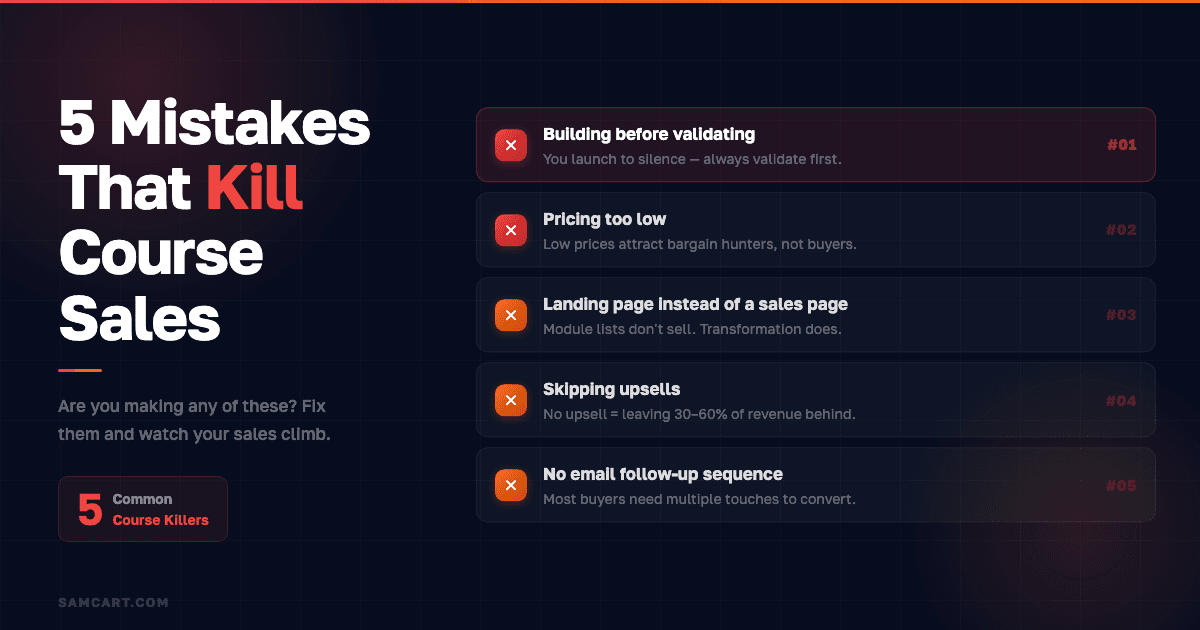
1. Building before validating. You spend six weeks creating a course, launch it, and hear crickets. Always validate with the 10-person test before you invest significant time in creation.
2. Pricing too low. A $27 course attracts bargain hunters, not committed students. Low prices also make it impossible to run profitable ads or pay affiliates. Price for the value you deliver, not the insecurity you feel.
3. Using a course landing page instead of a sales page. A description of your modules is not a sales page. You need a headline, pain points, transformation, social proof, guarantee, and a clear CTA. This single change can 5-10x your conversion rate.
4. Skipping upsells. If you're selling a course without an upsell or order bump, you're leaving 30-60% of potential revenue on the table. Create one complementary product and offer it at checkout. The lift is immediate.
5. No email follow-up sequence. Most people don't buy the first time they see your offer. Without a follow-up sequence that addresses objections and shares proof, you're losing 20-30% of potential sales.
How much can you make selling online courses?
The honest answer: it ranges from $0 to millions per year, depending on your niche, audience, and sales infrastructure.
Here's what we know from SamCart data across $7B+ in creator transactions. Courses are consistently a top-performing product category. The creators earning the most aren't necessarily the ones with the best content. They're the ones with the best sales systems: optimized checkout pages, upsells, order bumps, and automated follow-up sequences.
The top-performing niches for course revenue on SamCart include fitness, business education, and finance. But successful courses exist in nearly every niche, from photography to dog training to bookkeeping.
A realistic first-year target for a new course creator: $5,000-$20,000 from your first course. This assumes you validate your topic, price at $97-$297, build a real sales page, and launch to an email list of at least a few hundred people. Add upsells and you're looking at 30-60% more on top of that.
SamCart Editorial Team
Brian Moran
Founder
Samara Lemon
VP of Marketing
Leilani Treuting
Marketing Director
Scott Moran
Co-Founder
Frequently Asked Questions
Frequently asked questions
How long should my online course be?
Most successful courses run 3-5 hours of total content, broken into modules of 5-15 minutes each. Longer isn't better. Students want transformation, not volume. A focused 3-hour course that delivers a clear outcome will outsell and outperform a 20-hour course that tries to cover everything. Start short, then expand based on what students actually need.
Do I need a big audience to sell an online course?
No. Many successful course creators launch to email lists of just a few hundred people. What matters more than list size is list quality. 200 people who are genuinely interested in your specific topic will outperform 10,000 generic followers every time. Start with your warmest audience and grow from there.
What equipment do I need to create an online course?
At minimum: a smartphone or laptop with a camera, a decent USB microphone ($50-$100), and screen recording software (many free options exist). That's it for your first course. Production quality matters far less than content quality and teaching clarity. Upgrade your equipment after you've validated demand and generated revenue.
Should I sell on Udemy or my own platform?
On your own platform. Udemy gives you access to a large audience, but you keep only 37% of organic sales (and just 15% on Udemy Business subscriptions as of 2026). You don't get student emails, you can't control your pricing, and Udemy can discount your course to $9.99 without your permission. Your own platform lets you keep your revenue, build your brand, own the customer relationship, and add upsells. Use Udemy as a discovery channel if you want, but make your own platform the home base. Learn how to sell digital products on your own terms.
What's the best price for a first course?
$97-$197 for a self-paced signature course. This price range signals real value (unlike $27-$47), attracts committed students, and gives you margin to run ads or pay affiliates. If your course solves a specific, high-value problem (like helping someone land a job, grow their business, or develop a marketable skill), don't be afraid to price at $297-$497. For a deeper look at how upsells can increase your course revenue, check out our upsell strategies guide.