How to Sell Templates Online: From Design to Passive Income
Published On
Updated On

Brian Moran
Founder

Samara Lemon
VP of Marketing

Leilani Treuting
Marketing Director

Scott Moran
Co-Founder

SamCart is the digital business platform that builds, runs, and scales your online business. AI handles the hard parts, so you keep more of what you earn.
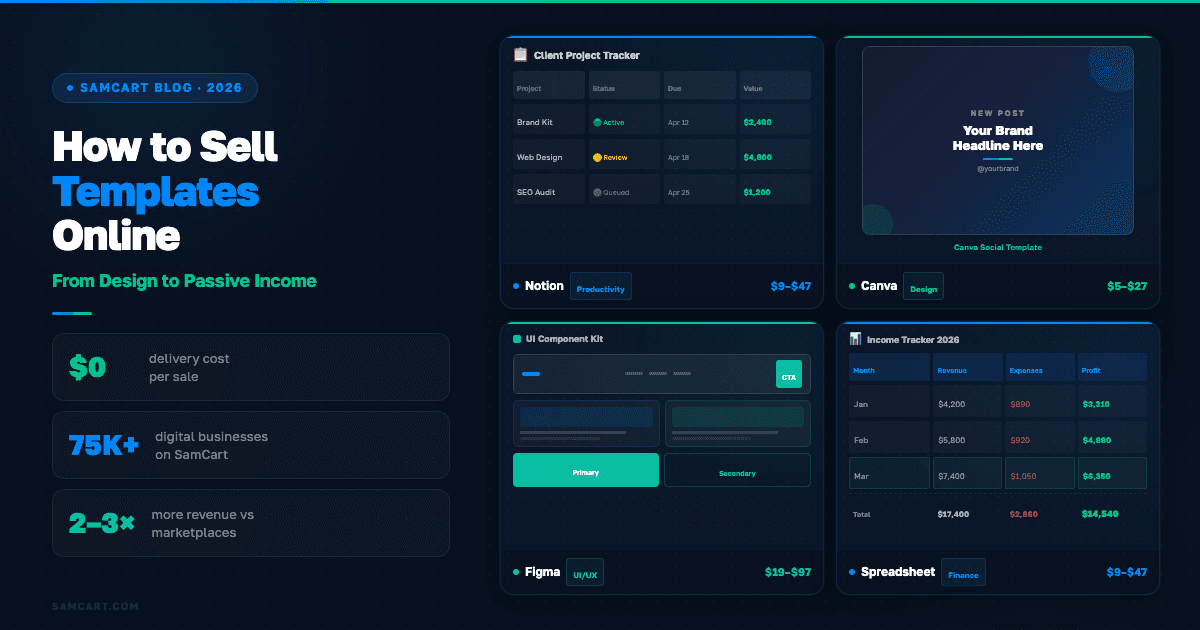
Table of Contents
Title
Share this article
You can sell templates online by choosing a specific niche and tool (Notion, Canva, Figma, spreadsheets), packaging your templates into bundles priced between $27 and $197, and selling through your own sales page instead of relying solely on marketplaces. Template sellers who own their checkout and layer in bundles consistently out-earn marketplace-only sellers by 2-3x at the same volume.
Templates are the fastest path from "I want to sell something online" to actual revenue. They are cheap to create, easy to price, and customers understand the value the moment they see them. A Notion project management template, a set of Canva social media graphics, A spreadsheet budget tracker. These solve specific problems, and people will pay for that.
But here is what most template-selling guides get wrong: they stop at "list it on a marketplace and wait." That works for your first few sales. It does not work for building a business. The creators who turn templates into six-figure income streams do it by owning their sales page, stacking upsells and order bumps, and building a product ladder from $9 singles to $29/mo memberships.
This guide covers the full path, from picking your niche to scaling a real template business, backed by data from 75,000+ digital businesses on SamCart.
Why Templates Are the Perfect First Digital Product
If you have never sold anything online before, templates are the lowest-risk starting point. Here is why they work so well for first-time sellers.
Creation cost is near zero. You are packaging expertise you already have into a format someone else can use. A project manager builds their ideal Notion workspace and sells it. A designer creates a brand kit in Canva and sells the template. No filming, no course production, no software development.
Demand is built in. People search for templates because they want a shortcut. They do not want to build a Notion system from scratch or design Instagram posts from a blank canvas. They want the finished framework and the ability to customize it. That intent makes templates one of the highest-converting digital product types.
Margins are almost pure profit. Once a template is created, every sale costs you nothing to deliver. No inventory. No shipping. No per-unit production cost. A $27 template sold 100 times is $2,700 in nearly pure profit.
Templates lead to bigger products. This is the part most sellers miss. A $19 Notion template buyer is the perfect customer for your $47 template bundle, your $29/mo template vault membership, and eventually your $297 course teaching how to build systems like yours. Templates are not just a product. They are the entry point to a product ladder.
Template sellers are one of the fastest-growing niches across digital product platforms, and for good reason. The economics simply work.
7 Types of Templates You Can Sell Online
Not all templates are created equal. Here is what is selling right now, with realistic pricing benchmarks.
Template Type | Examples | Single Price | Bundle Price |
|---|---|---|---|
Notion templates | Project management, life OS, habit trackers, CRM | $9–$47 | $27–$97 |
Canva templates | Social media posts, presentations, branding kits | $5–$27 | $47–$147 |
Figma/design templates | UI kits, wireframes, design systems, icon packs | $19–$97 | $97–$297 |
Spreadsheet templates | Budgets, financial trackers, business planning | $9–$47 | $27–$97 |
Email/marketing templates | Newsletter designs, email sequences, campaign frameworks | $9–$37 | $27–$97 |
Website templates | Landing pages, portfolio sites, link-in-bio pages | $19–$67 | $47–$197 |
Document templates | Contracts, proposals, SOPs, client onboarding packets | $9–$47 | $27–$97 |
Notion templates are the hottest market right now. The Notion creator ecosystem on Twitter/X has exploded, and buyers are actively searching for templates that save them setup time. Canva templates follow close behind, driven by small business owners and social media managers who need professional graphics without a designer.
The sweet spot for most sellers is picking one tool and one audience segment, then going deep. "Canva templates" is a market. "Canva Instagram story templates for real estate agents" is a business.
7 Steps to Sell Templates Online
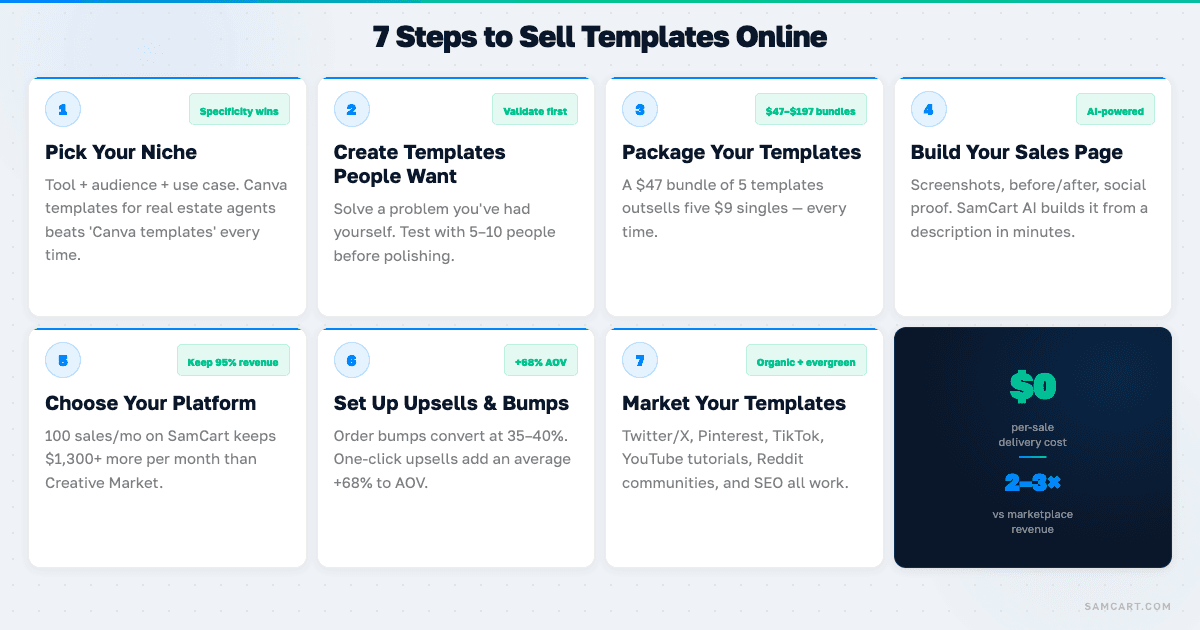
Step 1: Pick Your Template Niche (Specificity Wins)
The biggest mistake new template sellers make is going too broad. "Notion template" gets lost in a sea of thousands. "Notion client onboarding template for freelance web designers" stands out immediately because it solves a specific problem for a specific person.
Your niche formula: tool + audience + use case. Canva + real estate agents + listing presentations. Google Sheets + freelancers + income and expense tracking. Figma + SaaS startups + onboarding screen wireframes.
Research demand before you build. Browse Gumroad, Etsy, and Creative Market to see what is already selling in your tool category. Check Twitter/X and Reddit communities (r/Notion, r/CanvaDesign) for recurring questions and pain points. The templates that sell best are the ones that answer a question people keep asking.
Step 2: Create Templates People Actually Want
Start by solving a specific pain point you have experienced yourself. The best templates come from creators who built something to solve their own problem and then realized other people have the same problem.
Before you invest hours polishing, test with 5-10 people for free. Send it to your audience, post it in a relevant community, or share it with colleagues. Their feedback will tell you what is actually valuable and what needs to change.
Polish matters more than you think. Templates are judged by appearance and function. A Notion template with sloppy formatting or a Canva template with misaligned elements signals low quality, even if the underlying framework is strong. Take the time to make it look professional.
AI tools can accelerate your creation process. Canva's AI features, Notion AI, and SamCart's AI Assistant can help you generate descriptions, refine layouts, and build the sales copy for your template product.
Step 3: Package Your Templates (Bundles Beat Singles)
Packaging is your pricing strategy. Here is the hierarchy that works across template types:
Single template: $9–$27. The entry point. Low commitment, easy yes. This is your customer acquisition product.
Template bundle: $47–$197. Three to ten related templates packaged together at a perceived discount. This is where most of your revenue comes from. A $47 bundle outsells five $9 singles every time.
Template + tutorial: $27–$97. A template plus a video walkthrough showing exactly how to use and customize it. The tutorial adds perceived value far beyond the time it takes to record.
Template + customization guide + community access: $97–$297. The premium tier. This is where template selling starts to feel like a real business rather than a side hustle.
The lesson: do not just sell individual templates. Package them. Bundles convert at higher price points because buyers feel like they are getting a deal, and your revenue per customer multiplies.
Step 4: Build Your Sales Page
Listing a template on a marketplace with a title and two sentences is not a sales page. It is a product listing, and it converts like one.
A real sales page for templates includes preview screenshots showing the template in action, before-and-after examples (messy desk vs. organized Notion workspace), a video walkthrough demonstrating the template, testimonials from beta users or early customers, and clear formatting of what is included.
You do not need design skills to build this. SamCart's AI builds your sales page from a description of your template product. It writes the copy, designs the layout, and optimizes it based on conversion data from $7B+ in transactions. You go from template description to published sales page in minutes instead of days.
Step 5: Choose Your Platform (The Fee Math Matters)
This is where most template-selling guides lead you astray. They default to marketplaces because marketplaces are easy. Easy is not the same as profitable.
Here is the real math:
Platform | Fees Per Sale ($47 template) | Monthly Cost | Upsells? | AI Sales Pages? |
|---|---|---|---|---|
Gumroad | ~$6.36 (10% + processing) | Free | No | No |
Etsy | ~$4.50 (listing + 6.5% commission) | Free + listing fees | No | No |
Creative Market | $14.10 (30% commission) | Free | No | No |
SamCart | ~$1.66 (payment processing only) | $79/mo | Yes | Yes |
At 100 sales per month on a $47 template, here is what you keep:
Gumroad: $4,700 - $636 in fees = $4,064
Etsy: $4,700 - $450 in fees = $4,250
Creative Market: $4,700 - $1,410 in fees = $3,290
SamCart: $4,700 - $166 processing - $79 subscription = $4,455
SamCart saves you $205-$1,165 per month compared to marketplace alternatives at that volume. And that does not account for the additional revenue from upsells and order bumps that marketplaces do not support.
The smart play: start on marketplaces for validation and discovery traffic. Once you are getting consistent sales, move to your own SamCart sales page where you keep more revenue, own your customer list, and unlock upsell capabilities. Run both simultaneously if you want marketplace exposure plus your own direct channel.
Step 6: Set Up Upsells and Bundles
This is the step that separates template side hustles from template businesses. Once a customer buys your $27 template, they have already decided to trust you with their money. That is the hardest part. Now make the most of it.
Order bump: "Add the customization video guide for $17?" Order bumps on SamCart convert at 35-40%, which means roughly a third of your buyers add $17 to their order without a second thought. That turns your $27 sale into a $33 effective average.
One-click upsell: "Get the complete template vault (10 templates) for $97?" At a 20-25% take rate, this adds another $19-$24 to your average order value. Your $27 template just became a $50+ transaction.
The combined effect: same customer, same traffic, 2x the revenue. This is the Business Math that marketplace sellers never access because Gumroad, Etsy, and Creative Market do not offer post-purchase upsells.
Step 7: Market Your Templates (Where Template Buyers Hang Out)
Template buyers are not hard to find. They are already congregating in specific places online.
Twitter/X is the epicenter for Notion and productivity template sales. The #NotionTemplate and #BuildInPublic communities are massive, and creators who share their template-building process attract buyers organically.
Pinterest drives significant traffic for design templates like Canva graphics, social media templates, and wedding planning spreadsheets. Pins have a long shelf life, so a single pin can drive sales for months.
TikTok template reveal videos routinely get millions of views. The "template tour" format, showing a beautifully organized Notion workspace or a polished Canva brand kit, converts viewers into buyers because they can see exactly what they are getting.
YouTube tutorials that showcase your template while teaching a related skill build trust and drive high-intent traffic. "How I organize my freelance business in Notion" with a template link in the description.
Reddit communities like r/Notion, r/CanvaDesign, and r/Figma are where buyers actively ask for template recommendations. Be genuinely helpful first, and your templates sell themselves.
SEO still works. Long-tail keywords like "best Notion CRM template for freelancers" or "Canva Instagram template for coaches" have low competition and high purchase intent.
Marketplace vs. Your Own Website: The Real Math
The marketplace-vs-own-site debate has a clear answer, and it is not either/or.
Marketplaces win at discovery. Etsy, Gumroad, and Creative Market have built-in search traffic. Buyers browse these platforms looking for templates. You benefit from their audience without running ads.
Your own site wins at revenue. No commissions eating your margin. Full control over pricing, branding, and the customer experience. Email capture so you can sell to the same buyer again. And the ability to add order bumps and upsells that marketplaces simply do not support.
The winning strategy is both. List on marketplaces for visibility and validation. Drive buyers to your own SamCart page through social media, email, and content marketing. Over time, shift more volume to your direct channel where the economics are dramatically better.
Here is the number that makes this decision easy: a template seller doing $5,000/mo on Creative Market is paying $1,500/mo in commissions. That same seller on SamCart pays $79/mo plus payment processing. The difference is over $1,300/mo, or $15,600/year, back in your pocket. Add upsells, and your revenue is higher too.
How to Scale a Template Business
Selling individual templates is a starting point. Here is the product ladder that turns a template side hustle into a real business.
Level 1: Template vault or membership ($19–$49/mo). Instead of selling templates one at a time, offer access to your entire library for a monthly subscription. New templates each month give members a reason to stay. This creates recurring revenue that compounds over time.
Level 2: Premium custom templates ($497–$2,000). Once you have a reputation for quality templates, offer custom template creation as a high-ticket service. A custom Notion workspace built for a specific company's workflow commands premium pricing.
Level 3: Course teaching your process ($197–$497). The people buying your templates want to learn how you built them. Package your template creation expertise into a course. Your template buyers are the warmest possible audience for this product. (Here is a guide to selling courses if you are ready for that step.)
Level 4: Affiliate program. Template buyers who love your work become your best promoters. An affiliate program turns happy customers into a sales team that earns commission for every referral.
The product ladder in action: $9 single template → $47 bundle → $29/mo vault membership → $297 course. A customer who enters at $9 and climbs the ladder is worth over $600 in the first year. That is the difference between selling templates and building a template business.
Template Pricing Guide
Pricing templates correctly is critical. Price too low and transaction fees eat your margin. Price too high and you lose the impulse-buy psychology that makes templates sell.
Here are data-backed pricing benchmarks by category:
Category | Single Template | Bundle (3-10) | Premium Bundle |
|---|---|---|---|
Notion | $9–$47 | $27–$97 | $97–$197 |
Canva | $5–$27 | $47–$147 | $97–$247 |
Figma | $19–$97 | $97–$297 | $197–$497 |
Spreadsheets | $9–$47 | $27–$97 | $67–$197 |
Why $9 is the floor: At $7, payment processing fees ($0.30 + 2.9%) take $0.50 off the top. Marketplace commissions take another $0.70-$2.10. You are left with $4.40-$6.20 per sale. That is not a business. At $9, you keep meaningfully more per transaction, and the buyer does not perceive a $2 difference.
Why bundles should start at $27: The jump from $9 to $27 is small for the buyer but represents 3x revenue for you. A bundle of 5 templates at $27 feels like a steal compared to buying them individually at $9 each ($45 total). The buyer saves money, and you earn more per transaction.
Ready to turn your templates into a real business? Start your free SamCart trial and build your template sales page with AI in minutes. Every plan includes one-click upsells, order bumps, and membership features for template vaults, starting at $79/mo.
SamCart Editorial Team
Brian Moran
Founder
Samara Lemon
VP of Marketing
Leilani Treuting
Marketing Director
Scott Moran
Co-Founder
Frequently Asked Questions
Frequently Asked Questions
Do I need design skills to sell templates online?
Not necessarily. Notion templates, spreadsheet templates, and document templates require organizational thinking more than visual design skills. For Canva and Figma templates, basic design knowledge helps, but Canva's drag-and-drop interface and built-in AI make professional-looking templates accessible to non-designers. Start with the tool you already know well.
Can I sell templates made with free Canva?
Yes. Canva's free plan allows you to create and sell templates commercially. However, you cannot resell Canva's stock elements as standalone files. The template itself, your design and layout, is yours to sell. Canva Pro gives you access to more elements and features, but it is not required to start selling.
How do I protect templates from being copied and resold?
You cannot fully prevent copying with digital products, but you can reduce it. Include your branding within the template. Add a terms-of-use file that prohibits redistribution. For Notion templates, share via duplication links rather than downloadable files. Focus more energy on creating a steady stream of new templates than on protecting old ones. Your speed and quality are your real moat.
What is the best template niche to start selling in 2026?
Notion productivity templates, Canva social media templates, and AI-prompt templates are the three fastest-growing niches right now. Notion's market is expanding as more businesses adopt it for project management. Canva templates serve the enormous small-business and creator market. AI-prompt templates are a newer category with less competition and growing demand.
How many templates do I need to start selling?
One. Seriously. Start with a single well-made template, validate that people want it, then build from there. Many successful template sellers launched with one product and grew their catalog based on customer feedback. A focused start beats a scattered catalog of mediocre templates.
Can I sell the same template on multiple platforms?
Yes. There is no exclusivity requirement on most platforms (Gumroad, Etsy, SamCart). Creative Market has some exclusivity options but does not require them by default. Selling on multiple platforms simultaneously maximizes your reach. Just make sure your pricing is consistent across channels.