10 Best Online Teaching Platforms in 2026 (For Creators, Not Classrooms)
Reading Time
8
Published On
Updated On

Brian Moran
Founder

Samara Lemon
VP of Marketing

Leilani Treuting
Marketing Director

Scott Moran
Co-Founder

SamCart is the digital business platform that builds, runs, and scales your online business. AI handles the hard parts, so you keep more of what you earn.
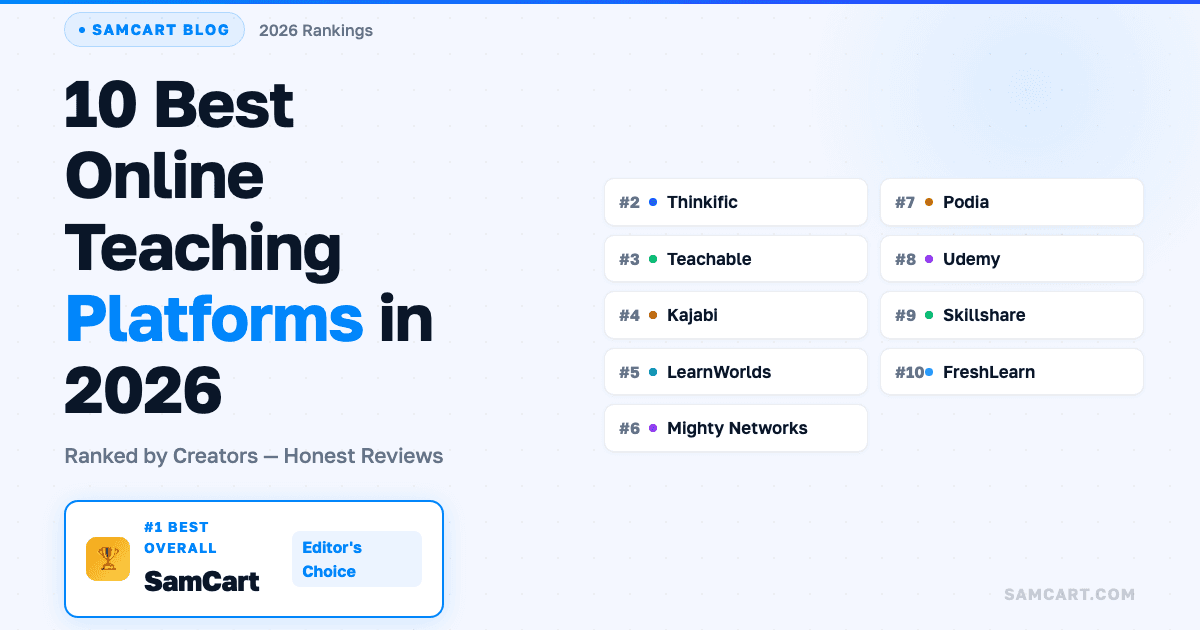
Table of Contents
Title
Share this article
The best online teaching platform for creators in 2026 is SamCart. It starts at $79/month, includes AI that builds your course pages, writes your sales copy, and creates checkout flows, and it's fine-tuned on $7B+ in real transaction data to help you sell more of what you teach.
Most online teaching platform guides compare classroom features like quizzes, grading, and video hosting. Those things matter. But they miss the question that actually determines whether your course business succeeds: can the platform help you sell? Teaching is the easy part. Getting someone to pull out their credit card, complete the purchase, and then buy more from you? That's where most creators get stuck, and where the right platform makes all the difference. SamCart creators who add a single upsell to their checkout see a 42% increase in Day 1 average order value. That's the gap between a teaching platform and a business platform.
Here's the truth about online teaching in 2026: there has never been a better time to turn what you know into income. The global e-learning market is projected to hit $457 billion, and creators across every niche are building real businesses around their expertise.
But the platform you choose determines whether you become one of them.
Most "best online teaching platforms" guides are written from an educator's perspective. They compare LMS features, student management tools, and quiz builders. That's useful if you're running a university. It's incomplete if you're a creator trying to build a business.
This guide is different. We're comparing these platforms from the creator business perspective: which one helps you build, sell, and scale your course? Not just host it.
Online teaching platforms: what's changed in 2026
The online teaching landscape looks completely different than it did even two years ago. Three shifts are reshaping which platforms are worth your time.
AI went from "nice to have" to "builds the whole thing." In 2023, AI on teaching platforms meant a chatbot that could outline your course. In 2026, the best platforms use AI to write your sales pages, create your course content, design your checkout flow, and even suggest pricing based on real data. The gap between platforms with real AI and platforms that slapped an AI label on a text box is enormous.
Community became the retention engine. Courses with community components see dramatically higher completion rates and repeat purchases. Platforms that treat community as an afterthought (or require you to bolt on a separate tool) are falling behind platforms that build community into the core experience.
The "platform as host" model is dying. Creators don't just need somewhere to put their videos. They need a business platform that handles the full lifecycle: build the product, create the sales page, process payments, add upsells, manage subscriptions, and grow the customer relationship. Platforms that only solve the "hosting" problem are losing ground to platforms that solve the "revenue" problem.
What to look for in an online teaching platform (creator checklist)
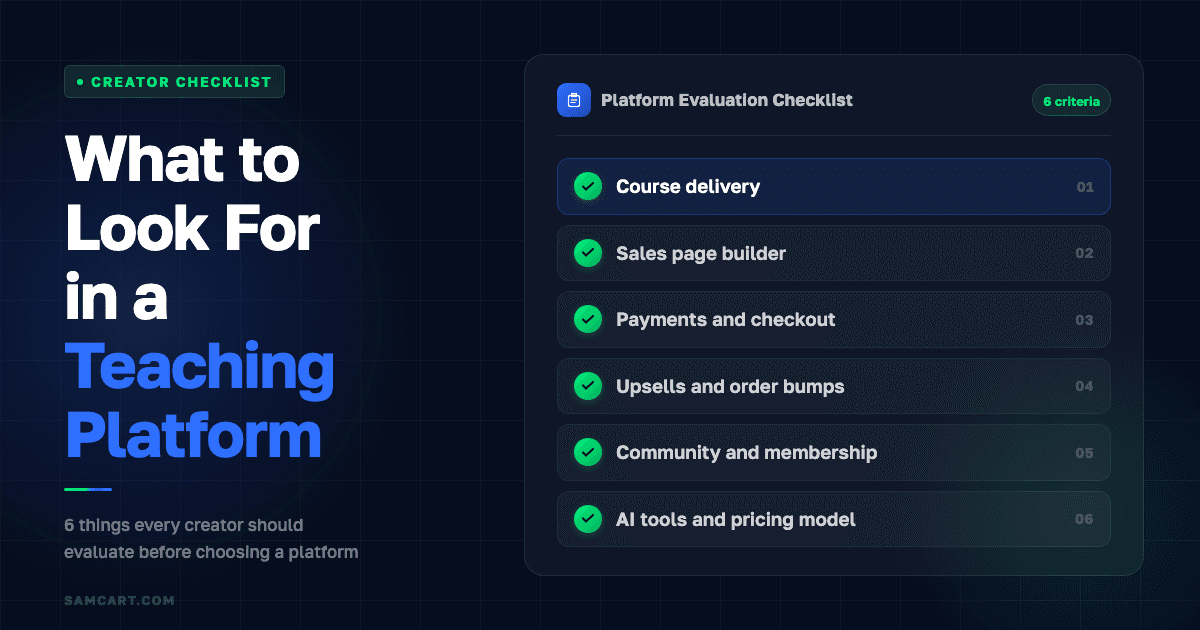
Before comparing individual platforms, here's the checklist that separates platforms built for creators from platforms built for classrooms.
Course delivery. Can you host videos, PDFs, drip content, quizzes, and worksheets? This is table stakes. Almost every platform on this list handles it.
Sales page builder. Can you create a page that actually convinces someone to buy? Most teaching platforms give you a basic landing page. The best ones give you AI-powered sales pages built on real conversion data.
Payments and checkout. Can you accept credit cards, PayPal, Apple Pay, and offer payment plans? More importantly: is the checkout optimized for conversion, or is it a generic payment form?
Upsells and order bumps. Can you offer a related product during checkout? This single feature is the difference between a $50 sale and an $85 sale. Most teaching platforms don't offer it at all.
Community and membership. Can you create a space where students interact, ask questions, and stay engaged? Retention drives lifetime value.
AI tools. Can the platform's AI create your course content, write your sales copy, and build your pages? Or do you still need to do everything manually?
Pricing model. Does the platform charge flat monthly fees regardless of your success? Does it take a percentage of your sales? Or does it align with your growth through revenue-based pricing?
The uncomfortable reality: most online teaching platforms only cover two or three of these. That's why so many creators end up duct-taping together a course host, a landing page builder, an email tool, and a payment processor. The best platforms cover all of it.
10 best online teaching platforms compared
Platform | Starting Price | Best For | AI Tools | Course Hosting | Upsells | Transaction Fees |
|---|---|---|---|---|---|---|
SamCart | $79/mo | Creators who want to build, host, and sell courses with AI | Full AI (pages, copy, products) | Yes (unlimited) | Yes (one-click) | 0% |
Thinkific | Free / $49/mo | Pure course delivery + analytics | Basic (outlines) | Yes | Limited | 0% on paid plans |
Teachable | Free / $59/mo | Easy first course launch | Basic | Yes | Basic | 5% on free plan |
Kajabi | $179/mo | Established creators with budget | Limited (paid add-ons) | Yes | Yes | 0% (with Kajabi Payments) |
LearnWorlds | $29/mo | Interactive video learning | Limited | Yes | Basic | $5/sale on starter |
Mighty Networks | $49/mo | Community-first learning | No | Yes (Business plan) | No | 2-5% |
Podia | Free / $39/mo | Simple, affordable starter | No | Yes | No | 8% free, 0% paid |
Udemy | Free to publish | Exposure to existing audience | No (for instructors) | Yes | No | 63-85% revenue share |
Skillshare | Free to publish | Supplemental income | No | Yes | No | Royalty model |
FreshLearn | Free / $25/mo | Budget all-in-one | Basic AI agents | Yes | Basic | 0% on paid plans |
1. SamCart: best all-in-one platform for building, hosting, and selling courses
Pricing: Starts at $79/month, revenue-based (scales as you grow) Best for: Creators who already have knowledge to sell and want the highest revenue per student
SamCart approaches online teaching from a fundamentally different angle than every other platform on this list. Instead of starting with "how do you deliver content?" it starts with "how do you make money from your content?"
That doesn't mean course hosting is an afterthought. SamCart includes full course hosting with unlimited courses, unlimited students, built-in video hosting, drip content, quizzes, and worksheets. The course delivery experience is solid.
But where SamCart pulls ahead is everything that happens around the course. The AI builds your sales page and writes your copy based on $7B+ in real transaction data. It knows what converts because it's analyzed what converts across hundreds of thousands of creators. The checkout is optimized with one-click upsells, order bumps, cart abandonment recovery, and A/B testing. Membership and community features are built in.
What stands out: Revenue-based pricing means every feature is included from day one at $79/month. No tier-gating. Creators who add a single upsell see a 42% jump in Day 1 average order value. That's not a feature comparison stat. That's from real SamCart data across $7B+ in processed sales.
Where it's not the best fit: If you need advanced LMS features like SCORM compliance, branching assessments, or formal certification programs, a dedicated learning platform like LearnWorlds or Thinkific will go deeper on the educational side.
2. Thinkific: best pure teaching experience
Pricing: Free plan available; paid plans from $49/month Best for: Educators who prioritize course structure, student analytics, and learning outcomes
Thinkific is built for people who think of themselves as teachers first. The course builder is one of the best in the market, with drag-and-drop lesson creation, multimedia support, progress tracking, completion certificates, and detailed student analytics.
What stands out: AI-powered course outlines help you structure your content faster. Student engagement analytics show you exactly where students drop off, so you can improve your material. Zero transaction fees on all paid plans. The app store adds flexibility for extending functionality.
Where it falls short: The selling infrastructure is basic. Marketing automation is limited, and you'll likely need external tools for email marketing and checkout optimization. The free plan caps you at three courses, and the $99/month Pro plan is where most serious creators land once they need features like removing Thinkific branding or accessing the Growth add-on ($50/month extra).
3. Teachable: best for easy onboarding
Pricing: Free plan available; paid plans from $59/month Best for: First-time course creators who want the fastest path from "I have an idea" to "my course is live"
Teachable's strength is simplicity. Over 150,000 instructors have used the platform, and the onboarding process is designed to get you publishing quickly. The drag-and-drop builder is intuitive, payment processing is built in, and you don't need any technical skills.
What stands out: Teachable Payments handles all payment processing with no additional setup. The coaching product is a nice bonus for creators who sell sessions alongside courses. The interface is clean and beginner-friendly.
Where it falls short: Customer support quality has been a consistent concern in recent reviews. AI features are basic compared to platforms that have invested more heavily in automation. Transaction fees on the free plan (5%) add up, and advanced conversion features are limited. No built-in community features, so you'll need a third-party tool like Discord or Circle.
4. Kajabi: best for established creators with budget
Pricing: Starts at $179/month ($143/month annual) Best for: Creators already earning consistent revenue who want email marketing, funnels, and courses in one platform
Kajabi is the premium all-in-one option. It bundles course hosting, email marketing, sales funnels, website building, podcasting, and community into a single platform. If you have the budget and want everything under one roof, Kajabi delivers breadth.
What stands out: Built-in email marketing is genuinely solid. The funnel builder (Pipelines) is well-designed. Community features are improving. For creators who want to avoid managing multiple tools, Kajabi's all-in-one approach has real value.
Where it falls short: The 2025 pricing overhaul hit hard. The entry-level Kickstarter plan ($89/month) was eliminated. Basic now starts at $179/month with just 5 products and 2,500 contacts. AI features are limited, with some (like video transcription) available only as paid add-ons at $90/month extra. Using your own Stripe account adds a 2% surcharge. Feature-gating on lower plans locks out affiliates, advanced automations, and API access.
5. LearnWorlds: best for interactive learning
Pricing: Starts at $29/month (with $5 per sale fee); Pro Trainer at $99/month Best for: Educators who want interactive video, social learning, and formal assessments
LearnWorlds stands out with interactive video features that let you add clickable elements, in-video questions, and branching paths. If your teaching style relies on rich media and student interaction, LearnWorlds gives you tools most platforms don't offer.
What stands out: Interactive video is a genuine differentiator. Built-in assessment and certification tools are among the best available. SCORM/HTML5 compliance opens the door to corporate training contracts. The eBook builder is a unique bonus.
Where it falls short: The $5 per sale fee on the starter plan adds up quickly as you scale. Setup is complex compared to simpler platforms. Marketing and sales tools are basic, so you'll likely need external solutions for checkout optimization and email automation.
6. Mighty Networks: best for community-driven courses
Pricing: Community plan at $49/month (3% transaction fee); Business plan at $119/month (2% fee) Best for: Creators whose teaching model centers on group interaction, live cohorts, and community engagement
Mighty Networks flips the typical model. Instead of "course with optional community," it's "community with optional courses." If your teaching approach depends on peer interaction, live events, and cohort-based learning, Mighty Networks does this better than anyone.
What stands out: The native mobile app experience is excellent. Live events, groups, and member profiles create genuine engagement. Cohort-based courses with built-in community spaces work well for coaching and group programs.
Where it falls short: Course creation features are only available on the $119/month Business plan. Transaction fees (2-5%) cut into your margins. There are no upsells, no order bumps, and no real checkout optimization. You'll need separate tools for your website, landing pages, and email marketing.
7. Podia: best simple, affordable starter
Pricing: Free plan (8% transaction fee); Mover plan at $39/month; Shaker plan at $75/month Best for: Creators on a tight budget who want courses, downloads, and community in one simple package
Podia's pitch is "everything you need, nothing you don't." The Mover plan at $39/month includes courses, digital downloads, a website builder, email marketing, and community through Discord integration. For a creator just getting started, the simplicity is a real advantage.
What stands out: The price-to-feature ratio is strong for beginners. Free migration from other platforms is a nice touch. No transaction fees on paid plans. The interface is clean and fast to learn.
Where it falls short: There are no upsells, no order bumps, no A/B testing, and no advanced checkout optimization. As your business grows, you'll outgrow Podia's selling capabilities. The community features are basic compared to purpose-built community platforms.
8. Udemy: built-in audience, but at a steep cost
Pricing: Free to publish; Udemy takes 37-85% of revenue Best for: Creators who want exposure to an existing audience and don't mind giving up pricing control
Udemy gives you instant access to 67+ million learners. That's its biggest strength and its biggest trap. You don't need to bring your own audience. But you're building Udemy's brand, not yours.
What stands out: The built-in marketplace means students can discover your course without you doing any marketing. If you drive your own traffic through personal coupon links, you keep 97% of the sale.
Where it falls short: For marketplace (organic) sales, you keep only 37%. Udemy Business subscriptions now pay instructors just 15% as of January 2026, down from 25% in 2023. Udemy runs frequent site-wide sales that discount courses to $9.99 regardless of your listed price, and you can't opt out. You don't get student email addresses, you can't control your pricing, and students associate the experience with Udemy, not your brand. Udemy's CFO has acknowledged the company is "intentionally reducing" single-course sales to push subscriptions where Udemy keeps 85%.
The real cost: If you price a course at $199 and a student buys it during a Udemy sale for $9.99, your cut on an organic sale is 37% of $9.99: $3.70. On your own platform, you'd keep nearly all of the $199.
9. Skillshare: good for exposure, tough for revenue
Pricing: Free to publish; royalty-based payment model Best for: Creators who want supplemental income and brand visibility alongside their main platform
Skillshare pays instructors based on minutes watched, not course sales. You don't set your own price. Students pay Skillshare a subscription fee, and Skillshare distributes a royalty pool across all instructors based on watch time.
What stands out: The platform handles all marketing and student acquisition. For creative topics (design, photography, illustration), Skillshare's audience is a natural fit. The referral program pays bonuses for new subscriber sign-ups.
Where it falls short: You have zero control over pricing. Revenue per student is typically very low. Like Udemy, you're building Skillshare's brand and audience, not your own. There are no upsells, no email list building, and no checkout customization. Best used as a supplementary channel alongside your own platform.
10. FreshLearn: affordable all-in-one newcomer
Pricing: Free plan available; paid plans from $25/month Best for: Budget-conscious creators who want courses, community, email, and a blog in one place
FreshLearn is a newer entrant positioning itself as an affordable all-in-one alternative. The platform bundles course hosting, community features, a blog CMS, email automation, and AI-powered course creation tools, all with zero transaction fees on paid plans.
What stands out: The price is hard to beat. At $25/month for the paid plan, you get course hosting, community, email, automation, and AI tools for course creation. Zero transaction fees across all paid plans. The AI agents can help generate quizzes and course outlines.
Where it falls short: As a newer platform, the ecosystem is less mature. Advanced checkout features (one-click upsells, A/B testing, cart abandonment) are limited. The sales and conversion optimization tools don't match more established platforms. Community and user base are still growing.
Teaching platform vs. business platform: the real question
Here's the shift most creators miss when choosing an online teaching platform: the platform you use to deliver your course is less important than the platform you use to sell it.
Think about it this way. A great course on a platform with a mediocre checkout will underperform a good course on a platform with an optimized checkout. Your sales page, pricing, upsell strategy, and checkout experience determine how many people buy. Your course content determines whether they come back.
Traditional teaching platforms (Thinkific, Teachable, LearnWorlds) focus on the delivery side. They help you build great courses. But when it comes time to sell, they give you basic tools and hope for the best.
Business platforms like SamCart focus on the revenue side. They help you sell, upsell, and scale, with course hosting built in as part of the complete package.
Most creators need both capabilities. The question is which one should be the foundation of your business. If your biggest challenge is creating engaging course content, start with a teaching-first platform. If your biggest challenge is getting people to buy (which it is for most creators), start with a business-first platform.
How much can you make teaching online?
The range is enormous. Some creators make $0. Others make millions. The difference almost always comes down to three things: your niche, your audience, and your sales infrastructure.
Here's what we know from SamCart's data across $7B+ in creator transactions. Course creators who use one-click upsells see a 42% increase in average order value on Day 1. That means a creator selling a $97 course with a $47 upsell isn't just making $97 per student. They're averaging closer to $138 per student. Over 100 students, that's $13,800 instead of $9,700. Same course. Same audience. Better checkout.
The top-performing niches on SamCart? Fitness, business education, and finance consistently lead in transaction volume.
What separates the creators making real money from the ones stuck at a few hundred dollars a month usually isn't the quality of their teaching. It's whether they have sales infrastructure (upsells, order bumps, cart abandonment recovery) working behind the scenes.
How to choose the right platform for your course
If you're a beginner on a tight budget: Start with Podia ($39/month) or FreshLearn ($25/month). Both give you enough to launch your first course without a heavy investment. You can always migrate later as you grow.
If you're focused on course quality and student outcomes: Thinkific or LearnWorlds. Both invest heavily in the teaching experience with strong course builders, analytics, and assessment tools.
If you want community-driven learning: Mighty Networks. Its community-first model is ideal for cohort-based programs, group coaching, and peer learning.
If you want maximum revenue per student: SamCart. The AI-powered sales pages, one-click upsells, order bumps, and checkout optimization are built to turn your course into a real business. Revenue-based pricing means the platform grows with you.
If you want everything in one place and have the budget: Kajabi ($179+/month). The broadest feature set in one platform, but you'll pay a premium for it.
If you want exposure to an existing audience: Udemy, but use it alongside your own platform. Let Udemy drive discovery while you sell premium offerings through a platform where you control the pricing and keep the revenue.
SamCart Editorial Team
Brian Moran
Founder
Samara Lemon
VP of Marketing
Leilani Treuting
Marketing Director
Scott Moran
Co-Founder
Frequently Asked Questions
Frequently asked questions
Do I need a website to sell online courses?
No. Platforms like SamCart, Thinkific, Teachable, and Podia include built-in page builders that let you create sales pages and host your course without a separate website. SamCart's AI can build your entire sales page for you in minutes. That said, having your own domain pointed to your course platform makes your brand look more professional and helps with SEO long-term.
What's the best free platform for teaching online?
Thinkific and Podia both offer free plans, but with significant limitations (three courses on Thinkific, 8% transaction fees on Podia). Udemy is free to publish on, but takes 37-85% of your revenue. If "free" is your top priority, Thinkific's free plan is the best starting point. But most creators find that upgrading to a paid platform quickly pays for itself through better sales tools and zero transaction fees.
Can I use multiple platforms at the same time?
Yes, and many successful creators do. A common strategy is using Udemy or Skillshare for visibility and audience building, while selling premium courses through a platform like SamCart where you control pricing and keep your revenue. The key is having one platform as your "home base" where you own the customer relationship.
How do I migrate from Udemy to my own platform?
Udemy doesn't let you export student email addresses, which is the biggest limitation. You can reuse your course content (videos, materials) on any other platform since you own it. The best approach: start building an email list outside of Udemy now (through YouTube, a blog, or social media), create your premium course on your own platform, and use Udemy as a discovery channel that funnels students toward your owned ecosystem.
What's the difference between a marketplace and a hosted platform?
Marketplaces (Udemy, Skillshare) give you access to their existing audience but take a large cut of revenue and control pricing. Hosted platforms (SamCart, Thinkific, Teachable) let you keep your revenue and control your brand, but you bring your own traffic. For long-term business building, most creators are better served by a hosted platform where they own the customer relationship. How to create a membership site is a good next step once you've chosen your platform.