Canva vs Adobe Express: Which Design Tool Is Right for You?
Reading Time
9
Published On
Updated On

Brian Moran
Founder

Samara Lemon
VP of Marketing

Leilani Treuting
Marketing Director

Scott Moran
Co-Founder

SamCart is the digital business platform that builds, runs, and scales your online business. AI handles the hard parts, so you keep more of what you earn.
Table of Contents
Title
Share this article
Canva vs Adobe Express: Which Design Tool Is Right for You?
Canva and Adobe Express are two of the most popular graphic design tools for non-designers. Canva is best for beginners who need fast, template-driven design. Adobe Express is better for users with some design experience who want access to Adobe's professional ecosystem. But if you want AI to handle the design work entirely, Design AI by SamCart takes a different approach altogether.
For digital creators and entrepreneurs selling online, the design tool you choose directly affects how fast you can create content, how professional it looks, and how quickly you can get it in front of buyers. SamCart's Design AI eliminates the design step entirely by formatting your content automatically as you write, then connecting it directly to a checkout page where you can start selling.
When it comes to graphic design, the market is full of tools promising ease of use, affordability, and professional results. Canva and Adobe Express consistently sit at the top of the list. Both have real strengths, but they also have limitations that push many creators to look for alternatives.
This guide compares Canva, Adobe Express, and Design AI across the features that matter most: templates, ease of use, collaboration, AI capabilities, stock assets, and pricing. By the end, you'll know which tool fits your needs.
What Is Canva?
Canva is a graphic design platform launched in 2012 that made design accessible to everyone. It offers a drag-and-drop interface for creating social media posts, presentations, infographics, marketing materials, and more.
Canva is used in over 190 countries by students, small business owners, social media managers, and marketing teams. Its massive template library (over 3.8 million templates), built-in fonts, and design elements make it possible to create polished visuals without formal design training.
The platform works on web, iOS, and Android, so you can start a project on desktop and finish it on your phone.
Key Features of Canva
Over 3.8 million templates for marketing, social media, presentations, and more
Drag-and-drop editor with customizable design elements
Magic Resize for adapting designs to different platforms
Real-time collaboration with shared project folders
Integrations with Google Drive and Dropbox
AI features including Text to Image, Magic Eraser, and background removal
Weaknesses of Canva
Template-driven approach forces you to adapt content to pre-existing designs rather than building layouts around your needs
AI capabilities are basic compared to dedicated AI design tools
Customization becomes time-consuming when modifying templates with restricted layout options
Basic vector editing, limited export formats, and performance issues with large projects

What Is Adobe Express?
Adobe Express (formerly Adobe Spark) launched in 2016 as Adobe's simplified design tool for non-professionals. It brings some of Adobe's professional capabilities to a more accessible interface, with tools for creating graphics, web pages, and short videos.
Adobe Express is available on web, iOS, and Android. Its biggest strength is integration with Adobe Creative Cloud, giving you access to Adobe Stock, Adobe Fonts, and tools like Firefly AI.
Key Features of Adobe Express
Seamless integration with Adobe Creative Cloud, Photoshop, and Illustrator
Adobe Firefly AI with Text to Effect and Text to Fill features
Advanced layer control and one-click quick actions
Real-time collaboration
Access to over 200 million Adobe Stock assets (premium)
100GB cloud storage on premium plans
Weaknesses of Adobe Express
Interface is less intuitive than Canva, creating a barrier for beginners
Performance can be slow during complex design processes
Feature set is more limited than full Adobe tools like Photoshop
Limited advanced editing capabilities and restricted file format support
Alternative Design AI’s Design Approach
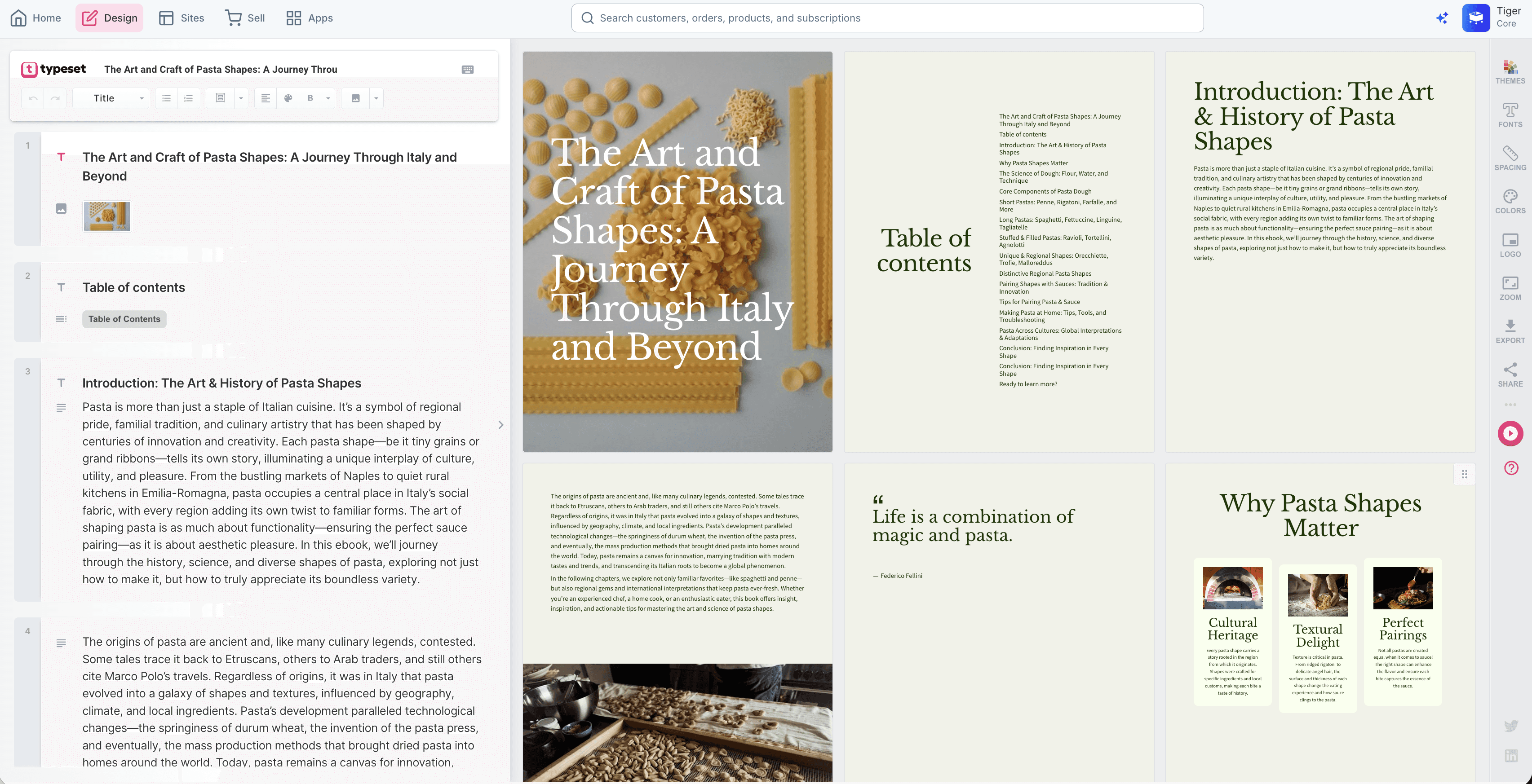
Design AI is an AI-powered design tool that automatically creates professional digital content, eliminating the traditional hassles of manual design work. Unlike conventional design tools that require users to work with templates and drag-and-drop elements, Design AI designs content on the fly as users input their content.
What Is Design AI?
Design AI by SamCart is an AI-powered platform that automatically designs your content as you write it. Instead of starting with a template and dragging elements around, you input your content and the AI handles formatting, layout, typography, and image selection in real time.
This makes it fundamentally different from both Canva and Adobe Express. Those tools give you design tools. Design AI does the designing.
The platform creates slide decks, presentations, eBooks, social media posts, banners, reports, ads, and more. It's built for creators and entrepreneurs who need professional content fast without design skills.
Key Features of Design AI
AI formats your content automatically as you type
Co-Author AI generates outlines, titles, and copy to break through writer's block
Magic Wand redesigns any section with one click
Brand Styling applies your logo, colors, and fonts across every project
Built-in access to 100M+ Getty Images and 5M Unsplash photos
Remix feature converts one piece of content into multiple formats (eBook to social posts, presentation to PDF, etc.)
Export to PowerPoint, PDF, and JPEG
Built into SamCart, connecting directly to checkout pages, order bumps, and one-click upsells
Weaknesses of Design AI
Works differently than traditional design tools, so there's a short learning curve (10-15 minute onboarding covers the basics)
Users with advanced design skills may want more manual customization options
No free version (30-day money-back guarantee, with discounted plans and 50% off for students, teachers, and nonprofits)
Comparing Features
Templates
Canva has the largest template library at 3.8 million+, covering virtually every use case. Templates are designed for simplicity and ease of use, making them ideal for beginners who need quick, ready-to-use designs.
Adobe Express offers fewer templates but emphasizes quality and sophistication. Templates feature intricate layouts and professional-grade design elements that appeal to more experienced users.
Design AI takes a different approach. Instead of starting from a static template, the AI generates layouts based on your actual content. You can also choose from professional templates for eBooks, presentations, reports, and social media, then let the AI adapt them to your content automatically.
Ease of Use
Canva is the most intuitive for pure beginners. The drag-and-drop editor and guided tutorials make it easy to start creating immediately.
Adobe Express has a slightly steeper learning curve due to advanced layer management and its connection to the broader Adobe ecosystem. It's better suited for users with some design background.
Design AI is the easiest if your goal is finished content, not learning design. Because the AI handles layout and formatting, you spend zero time on design decisions. You write, it designs. The interface is different from traditional tools, but the 10-15 minute onboarding gets you up to speed quickly.
Collaboration and Team Features
Canva offers customizable brand kits, shared project folders, and affordable team plans. It's the most accessible option for teams on a budget.
Adobe Express supports real-time collaboration and integrates with Photoshop and Illustrator, allowing teams to start in Express and move to professional tools for advanced editing.
Design AI focuses on collaborative content creation with real-time updates and brand consistency tools. Brand Styling ensures every team member's output matches your brand guidelines automatically, without manual formatting. (For teams with complex design needs, Figma is also worth considering.)
AI Tools
Canva offers Text to Image, Magic Eraser, and background removal. These are useful add-ons but still require you to make most design decisions manually.
Adobe Express uses Adobe Firefly for Text to Effect and Text to Fill. These are creative tools for generating dynamic visuals, but the AI assists with individual elements rather than complete layouts.
Design AI uses AI as the foundation of how the entire platform works. The AI analyzes your content in real time and generates complete designs, from layout and typography to image selection and formatting. Co-Author writes content for you. Magic Wand redesigns sections instantly. Remix converts between formats. AI isn't a feature added on top. It's how Design AI works.
Stock Images and Assets
Canva integrates with free resources like Unsplash and Pexels, offering a wide range of visuals for budget-conscious users.
Adobe Express provides access to Adobe Stock with over 200 million assets on premium plans. This is the strongest stock library of the three for niche or industry-specific imagery.
Design AI includes access to over 100 million Getty Images and 5 million Unsplash photos. The AI automatically suggests and incorporates relevant visuals based on your content, reducing the time spent searching for the right image.
Pricing
Canva:
Free plan: thousands of templates, basic tools, Unsplash integration
Pro ($12.99/month): premium templates, stock photos, AI tools, brand kits
Teams ($14.99/month per user): collaboration features, shared folders
Adobe Express:
Free plan: basic templates, limited stock assets, essential tools
Premium ($9.99/month): full Adobe Stock access, advanced editing, 100GB storage
Design AI:
Included with SamCart plans. Design AI features are part of SamCart's subscription, which means you get design tools, checkout pages, upsells, and digital delivery all in one platform. Check SamCart pricing for current plans.
Which Is the Best Option for You?
Choose Canva if:
You're a beginner who needs fast, simple design
You want the largest template library available
You need affordable team collaboration tools
Your primary need is social media graphics and marketing materials
Choose Adobe Express if:
You already use Adobe Creative Cloud tools
You have some design experience and want more control
You need access to Adobe Stock's 200M+ asset library
You create short videos and animations alongside graphics
Choose Design AI if:
You want AI to handle the design work so you can focus on content
You create eBooks, presentations, slide decks, or reports (not just social graphics)
You sell digital products and want your content connected directly to a checkout page
You need consistent branding across all content without manual formatting
You want to turn one piece of content into multiple formats with one click
The biggest difference comes down to this: Canva and Adobe Express give you tools to design. Design AI designs for you. And because it's built into SamCart, everything you create is one step away from a checkout page, order bumps, upsells, and digital delivery.
For more alternatives, check out our full 7 best Canva alternatives roundup. For eBook-specific tools, see our best AI eBook generators guide. And for presentations, read our top AI slide deck generators comparison.
Start Creating with Design AI
Stop spending hours dragging and dropping. Write your content, let AI design it, and sell it from the same platform.
Try Design AI risk-free with SamCart's 30-day money-back guarantee. See pricing.
SamCart Editorial Team
Brian Moran
Founder
Samara Lemon
VP of Marketing
Leilani Treuting
Marketing Director
Scott Moran
Co-Founder