Payment Processing for Online Business: How to Choose (2026)
Reading Time
6
Published On
Updated On

Brian Moran
Founder

Samara Lemon
VP of Marketing

Leilani Treuting
Marketing Director

Scott Moran
Co-Founder

SamCart is the digital business platform that builds, runs, and scales your online business. AI handles the hard parts, so you keep more of what you earn.

Table of Contents
Title
Share this article
Payment processing for an online business is the system that lets you accept credit card and digital payments from customers and get that money into your bank account. Your main options are stand-alone processors like Stripe, Square, and PayPal, or a platform that has processing built into the checkout, and the right choice comes down to how many separate tools you're willing to manage.
The quick answer: For most creators and small online businesses, the cheapest, fastest path isn't hunting for the lowest per-transaction fee. It's cutting the number of moving parts. A platform where checkout and payment processing are the same system removes an entire integration step, one you'd otherwise have to build, connect, and reconcile across two dashboards. SamCart has processed $7B+ in creator sales, so "built-in" doesn't mean "small-time."
If you're setting up your first online store, payment processing is the step that quietly stalls the most people. Not because it's hard, but because the advice online turns it into a research project, an endless string of Stripe-vs-Square-vs-PayPal comparisons that leave you comparing decimal points on transaction fees while your product still isn't live.
This guide keeps it plain. We'll define the pieces in normal language, compare the real options side by side, show you the fees that actually matter, and walk through setting up payments in under an hour, so you can start selling instead of researching.
What Counts as Payment Processing for an Online Business?
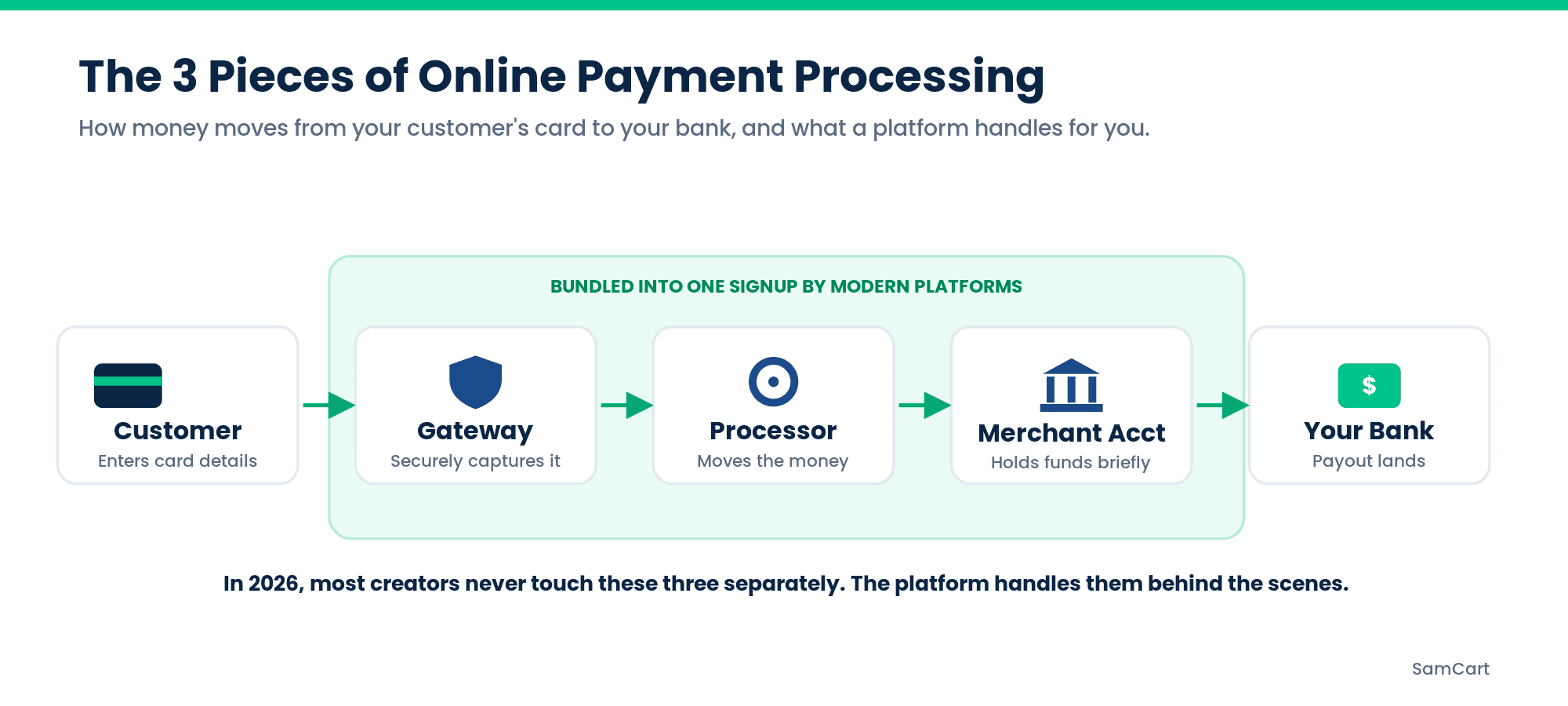
Payment processing is the movement of money from your customer's card to your bank account. Three terms get thrown around, and the jargon is where most beginners get stuck. Here's the plain-language version:
A payment processor is the company that handles the transaction. It communicates between the card networks, the customer's bank, and yours to move the money. Stripe and Square are processors.
A payment gateway is the piece that securely captures and passes card details from your checkout to the processor. Think of it as the secure tunnel the payment travels through. Many modern tools bundle the gateway into the processor, so you may never deal with it as a separate thing.
A merchant account is a special bank account that holds funds from card sales before they're deposited to your regular business account. Older setups required you to get one separately; most modern processors handle this behind the scenes.
Here's what actually matters for you: in 2026, most creators never touch these three things individually. Modern tools roll the gateway and merchant account into a single signup. The real decision isn't which gateway to pair with which merchant account. It's whether you stitch together separate tools or use one system that already includes everything.
The Main Payment Processing Options Compared
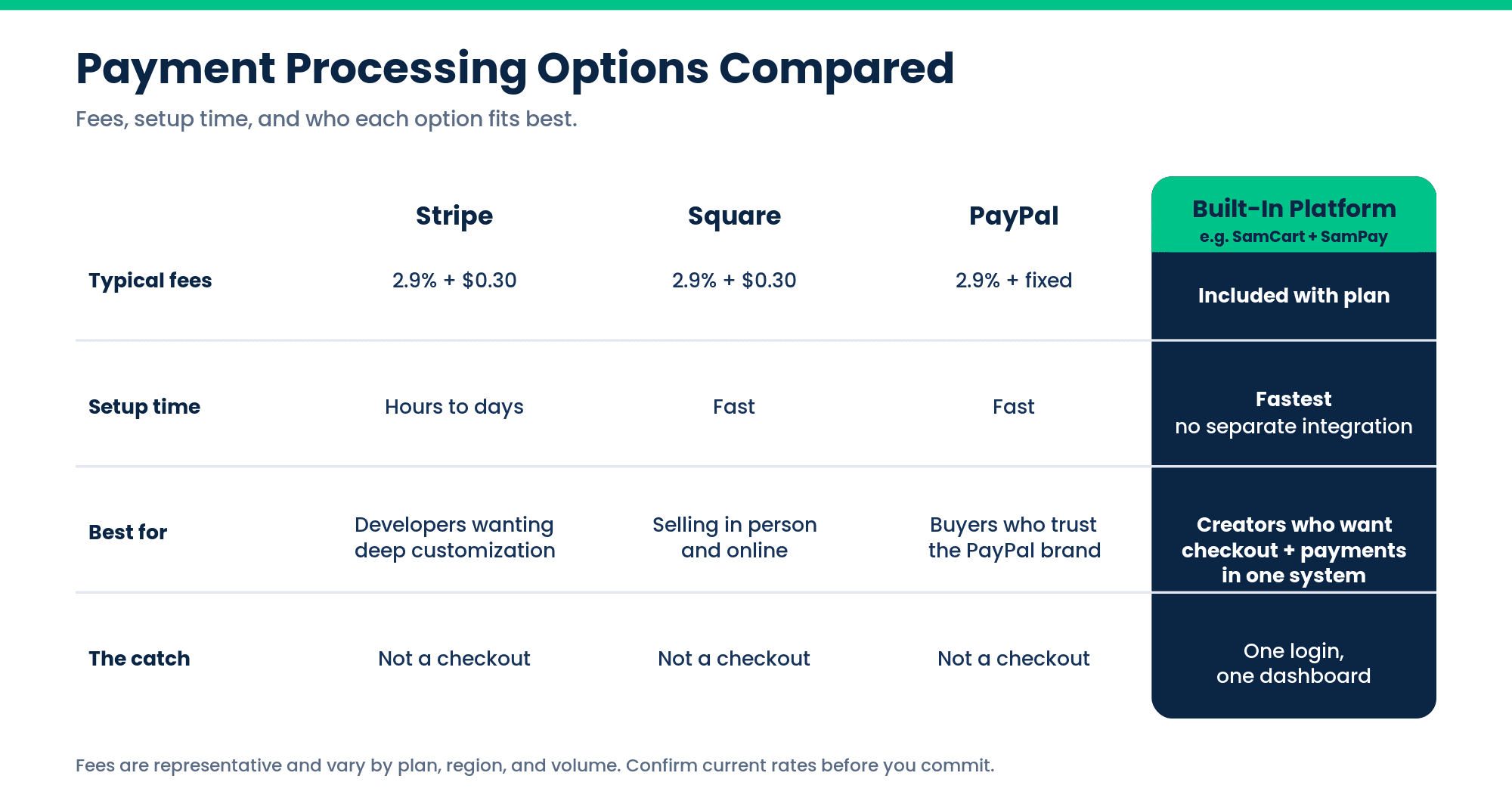
Here's how the four realistic paths stack up for a small online business:
Option | Typical fees | Setup time | Best for |
|---|---|---|---|
Stripe | ~2.9% + $0.30 per transaction | Hours to days (some dev setup) | Developers and businesses wanting deep customization |
Square | ~2.9% + $0.30 online | Fast | Businesses blending in-person and online sales |
PayPal | ~2.9% + fixed fee | Fast | Buyers who trust the PayPal brand at checkout |
Built-in platform processing | Included with the platform | Fastest, no separate integration | Creators who want checkout + payments in one system |
Fees are representative and vary by plan, region, and volume; always confirm current rates before you commit.
Stand-Alone Processors (Stripe, Square, PayPal)
Stand-alone processors are excellent at one job: moving money. They're reliable, widely trusted, and each has a niche.
Stripe is the developer favorite, enormously flexible, with deep APIs and customization. That power is also its cost: to build a real checkout on Stripe, you (or a developer) have to design the pages, wire up the integration, and handle the flow yourself. For a solo creator with no dev help, that's a real project.
Square shines if you also sell in person, like a coach who runs live workshops, because the same account covers your card reader and your online sales. Setup is fast and the dashboard is friendly.
PayPal carries brand trust. Some buyers are more comfortable clicking a PayPal button than typing a card number into a checkout they don't recognize, which can help conversion for first-time or skeptical customers.
The catch with all three: a processor is not a checkout. It processes the payment, but you still need something to build your sales page, your checkout, your order bumps, your upsells, and your customer records, and then you have to connect that something to the processor and keep both in sync.
Built-In Platform Processing

Built-in platform processing means your checkout and your payment processing live inside the same system, so accepting payments doesn't require a separate integration. You sign up once, connect your bank, and you're accepting cards, with no gateway to configure, no processor account to wire up, and no second dashboard to reconcile.
This is the "skip a step" option, and for creators it's often the right one. When checkout and processing are the same system, a sale flows straight through: the customer pays, the money is processed, and the order, the customer record, and any upsell all update in one place. You're not exporting data from a checkout tool into a processor, or trying to match a payout in one dashboard against an order in another at tax time.
This is where SamCart's own processing, SamPay, fits. It's built-in payment processing with no extra setup, the same system that runs the checkout, so there's one login, one record of every sale, and one place to see your money. Given that SamCart has processed $7B+ in creator sales, choosing built-in doesn't mean trading reliability for convenience.
The principle underneath this is simple: fewer tools is a feature. Every separate service you add is another login, another integration that can break, another bill, and another thing to reconcile. For a business you're running mostly yourself, the setup that removes steps usually beats the one that shaves a fraction of a percent off a fee.
Fees to Watch For
Fees are where "cheap" gets slippery. The headline rate is rarely the whole story.
Flat-rate pricing (like ~2.9% + $0.30) is predictable and beginner-friendly. You know exactly what each sale costs. This is what most creators should want early on.
Interchange-plus pricing passes through the raw card-network cost plus a fixed markup. It can be cheaper at high volume but is harder to predict and read. Skip it until your volume is large enough to justify the complexity.
Then there are the costs that hide in the fine print: chargeback fees (typically $15 to $25 when a customer disputes a charge, whether or not you win), currency conversion fees on international sales, payout fees or delays, and monthly minimums on some plans. When you compare providers, compare the all-in cost on a realistic month of sales, not just the advertised per-transaction rate.
What to Actually Look For (Beyond Price)
Price is the easiest thing to compare, which is exactly why people over-index on it. For an online business, these factors matter more than a fractional fee difference:
Speed of payout. How fast does money reach your bank, next day, two days, or a week? Cash flow matters more when you're small.
Fraud protection. Good processors screen suspicious transactions automatically. Getting hit with fraud and chargebacks early can be more expensive than any fee difference.
Recurring and subscription support. If you'll ever sell memberships, payment plans, or subscriptions, make sure the system handles recurring billing natively. Bolting it on later is painful.
International support. If you'll sell across borders, check which currencies and countries are supported and what the conversion costs are.
Whether it includes a checkout. This is the quiet differentiator. A processor that only processes leaves you to build and maintain everything else. A system that includes the checkout, order bumps, upsells, and customer management means one less category of tool to buy and connect.
Why Choose a Platform Over a Dry Payment Processor
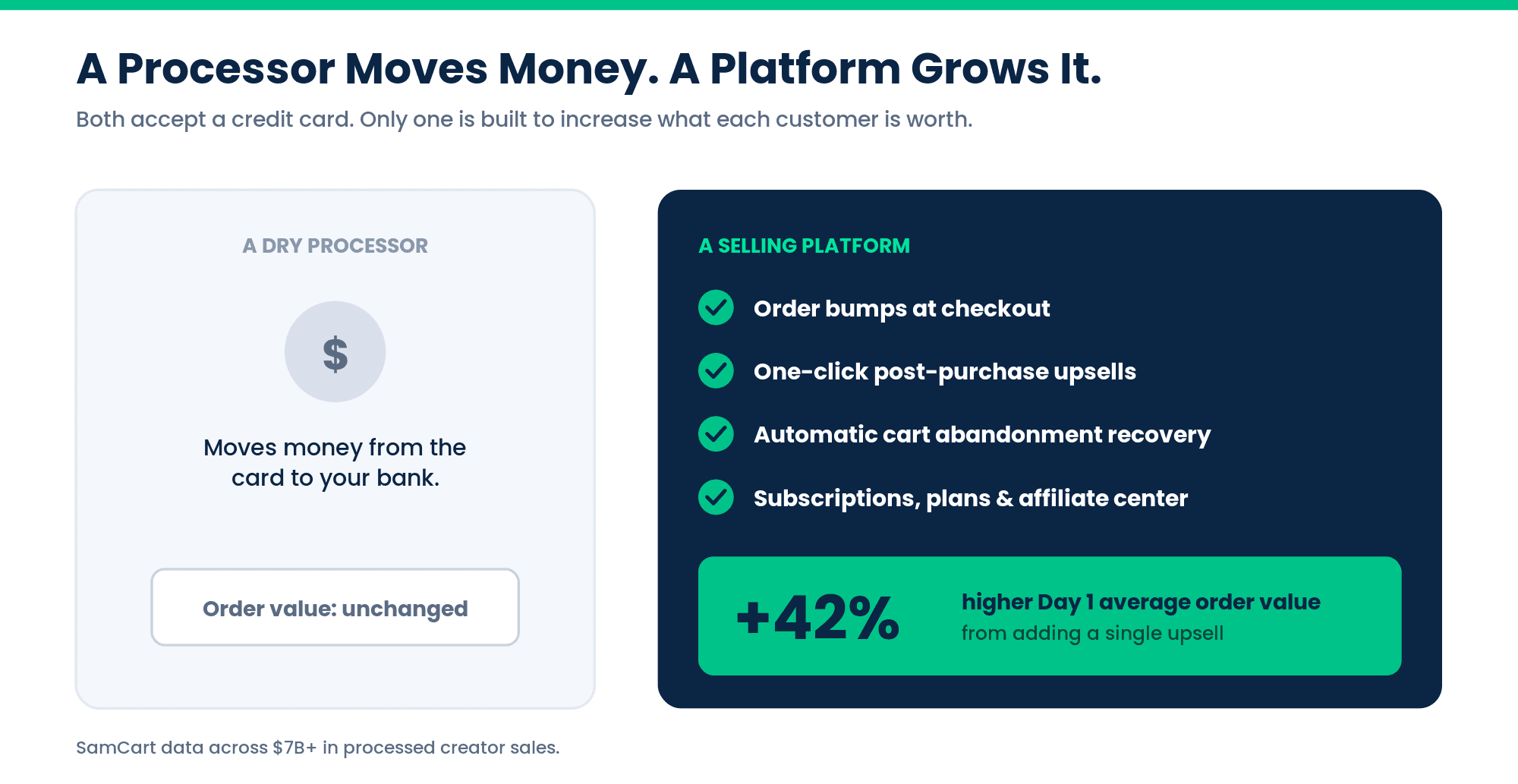
Here's the point that gets lost in every Stripe-vs-Square comparison: a payment processor only moves money. It doesn't help you make more of it. When your processing lives inside a platform built for selling, the same system that accepts the payment also works to grow the size of each order and win back the sales you'd otherwise lose. That's the real reason to choose a platform. The processing is table stakes; the selling tools are the payoff.
Here's what you get with SamCart that a stand-alone processor simply doesn't do:
Order bumps. Offer a complementary add-on right on the checkout page, like a template pack alongside a course or an accessory beside a product, that the customer adds with one click before paying. It raises the order size at the exact moment they've already decided to buy.
One-click upsells. After the purchase, present an additional offer the customer can accept without re-entering their card. Because you're asking after the "yes," it converts far better than cramming everything into the first sale. Across $7B+ in processed sales, SamCart data shows adding a single upsell produces an average 42% jump in Day 1 average order value, which is more revenue per customer with zero extra ad spend.
Cart abandonment recovery. Most people who start a checkout don't finish it. A dry processor lets those sales vanish. A platform captures the abandoned checkout and follows up automatically, recovering revenue you already earned the right to.
Subscriptions and payment plans. Sell memberships, recurring billing, or split a big purchase into installments, handled natively rather than bolted on.
An affiliate center and checkout-anywhere. Let others sell for you and commission them automatically, and drop your checkout onto any page, link, or site instead of forcing buyers through a fixed funnel.
Put together, that's the difference between a tool that processes your sales and a system that actively grows them. Both accept a credit card. Only one is built to increase what each customer is worth. See the built-in conversion tools for the full picture.
How to Set Up Payment Processing in Under an Hour
You don't need an enterprise setup or a developer. Here's the solo-creator path:
Pick your model. Decide up front: stand-alone processor plus a separate checkout tool, or one platform with processing built in. For most first-time creators, built-in is faster and simpler.
Create your account. Sign up and enter basic business details, including your name or business name, contact info, and what you sell.
Connect your bank account. This is where payouts land. Have your bank routing and account numbers ready.
Verify your identity. Processors are legally required to confirm who you are (this protects you and your customers). Have an ID handy; it's usually quick.
Set up your first product and checkout. With a built-in platform, this happens in the same place: create the product, set the price, and your checkout is live. With a stand-alone processor, you'll connect it to your separate checkout tool here.
Run a test transaction. Buy your own product (most tools have a test mode) to confirm money flows and the receipt looks right.
That's it. The whole thing is closer to opening an account than building software, as long as you don't get stuck comparing providers forever. If you want to move fastest, you can start accepting payments today with processing already included, and if you're weighing what's bundled at each tier, see what's included at every plan.
Conclusion
Payment processing for an online business doesn't have to be a research project. The real decision isn't which provider shaves a fraction of a percent off your fee. It's whether you stitch together separate tools or use one system where checkout and processing are already connected. For most creators, fewer moving parts wins.
That's the SamCart approach: built-in payment processing with no extra setup, backed by $7B+ in processed creator sales, so you can go from signup to your first sale in one sitting instead of one weekend.
Start your free trial with built-in processing included, or see SamPay details and rates to learn how it works.
SamCart Editorial Team
Brian Moran
Founder
Samara Lemon
VP of Marketing
Leilani Treuting
Marketing Director
Scott Moran
Co-Founder
Frequently Asked Questions
What is the cheapest way to process payments online?
The cheapest way for most small businesses is flat-rate processing (around 2.9% + $0.30 per transaction) combined with a platform that includes checkout, so you're not paying separately for a checkout tool on top of the processor. The lowest advertised fee isn't truly cheapest if it forces you to buy and maintain extra tools to actually use it.
Do I need a separate payment gateway?
Usually not. Most modern processors and platforms include the gateway automatically, so you sign up once and start accepting payments. You'd only need a separate gateway in older or highly custom setups. For the vast majority of creators, it's already handled.
What's the difference between a payment processor and a payment gateway?
A payment processor moves the money between the card networks and the banks to complete the transaction, while a payment gateway is the secure tunnel that captures and passes the card details to the processor. In most modern tools these are bundled together, so you deal with them as a single system rather than two products.
What is the best payment processor for a small online business?
The best choice depends on whether you want to manage separate tools. Stripe suits businesses wanting deep customization, Square fits those also selling in person, and PayPal adds buyer trust, but a platform with built-in processing like SamCart is often best for creators because checkout and payments live in one system with no separate integration to build or reconcile.
How long does it take to start accepting payments online?
For a solo creator, under an hour. Creating an account, connecting your bank, verifying your identity, and setting up your first product can all be done in one sitting, especially on a platform where checkout and processing are already the same system.